


An AI browser is a web browser with an assistant built in that can read the page you are on and, in agent mode, click, type and fill in forms for you. For SEO, that means a growing share of visits are made by a model reading your page on a person's behalf, often inside that person's own logged-in browser, where robots.txt does not apply and your analytics record an ordinary Chrome session.
Almost every page ranking for these products reviews them for consumers. This one is for site owners. It covers which AI browsers matter in October 2026 (ChatGPT Atlas is already gone), how each one fetches your pages, how their visits show up in GA4 and server logs, what agent mode needs from a page, the prompt-injection risks on your side, and a measurement plan you can run this week. Product details were checked against vendor documentation on October 24, 2026.
Key takeaways
- AI reaches your page in four ways: an agent inside the visitor's own browser, a cloud browser on the vendor's servers, a one-off fetcher such as ChatGPT-User, and the search crawler that built the index. Each one looks different in your logs.
- ChatGPT Atlas was retired on August 9, 2026. OpenAI's browsing now runs through the ChatGPT desktop app, a cloud browser and a browser extension. Advice to "optimize for Atlas" is out of date. The mechanics still apply.
- robots.txt does not stop an AI browser. It still decides whether you are in the indexes (OAI-SearchBot, PerplexityBot, Googlebot, Bingbot) that the assistant searches before it opens any page.
- In-browser agents look like Chrome. HUMAN Security found Comet's and Atlas's user agent and Client Hints matched standard Chrome. Clicks from AI answers are measurable through referrers and UTM tags. Autonomous agent sessions mostly are not.
- Agents fail where screen-reader users fail: unlabeled fields, hover-only menus, overlays and prices locked in images.
- Never hide instructions for AI in your pages. Browser vendors now scan every page for prompt injection, and hidden text is a spam-policy risk in Google Search.
What is an AI browser, and why does it matter for SEO?
An AI browser is any browser where an AI assistant can see the open page and act on it. The category has two shapes. Some are standalone browsers built around an assistant, like Perplexity's Comet. Others add an assistant to a browser people already use: Gemini in Chrome, Copilot in Edge, Claude in Chrome and the ChatGPT browser extension. All of them do three jobs: answer questions with web search, read and summarize the page in front of the user, and, in agent mode, complete multi-step tasks like comparing products, filling a cart or booking a table.
For SEO this matters at three points:
- Discovery still runs through a search index. Before an assistant opens any page, it searches. Comet uses Perplexity's search, Gemini uses Google's systems, Copilot uses Bing and ChatGPT uses its own search stack. If you are not indexed and retrievable there, the agent never reaches you. Our explainer on how ChatGPT search works walks through one of those stacks in detail.
- A model reads the page, not a person. The assistant answers from what it can extract. Facts in images, behind tabs that need a click or rendered late by JavaScript may be missed, and the user gets someone else's answer.
- Task completion becomes a ranking-like filter. When an agent cannot finish a step, it hands the task back to the person. Google's auto browse help page, for example, says the user must personally finish payments, accept terms and create accounts. Every extra blocker you add lands on a person who delegated the task to avoid exactly that.
Scale is still modest. Across 30 sites running the AI Rank Lab tag (page views whose referrer is an AI assistant, July 2025 to October 2026), the median site got just 0.21% of its tracked page views from AI assistants. Agent traffic is growing faster: HUMAN Security's 2026 State of AI Traffic benchmark reported that traffic from AI agents and agentic browsers grew 7,851% year over year in 2025, measured on its customers' properties.
Which AI browsers matter in October 2026?
Five products account for most AI-browser activity a site owner will meet: Perplexity Comet, ChatGPT's browsing surfaces, Gemini in Chrome, Browse with Copilot in Edge and Claude in Chrome. The table below compares them on the points that change what your server and analytics see. Everything was checked against the vendors' own pages on October 24, 2026.
| Product | Status and availability | Agent mode | Where the agent runs | Search answers come from | How it shows up to your site |
|---|---|---|---|---|---|
| Perplexity Comet | Free browser for Mac, Windows, iOS and Android; free since October 2, 2025 (TechRepublic). Comet Plus is a $5/month news add-on. | Comet Assistant acts in the user's tabs with permission | The user's own Comet browser, with their cookies | Perplexity search, built by PerplexityBot, with live fetches by Perplexity-User | Chrome-like user agent; clicks from Perplexity answers carry a perplexity.ai referrer |
| ChatGPT (Atlas retired) | Atlas stopped on August 9, 2026. Browsing now lives in the ChatGPT desktop app (macOS, Windows), a cloud browser and a browser extension; availability depends on plan and rollout | Cloud browser and extension complete tasks; the extension asks before acting on each new site | Built-in browser: inside the desktop app with its own state. Cloud browser: OpenAI's remote computer. Extension: the user's own browser profile | ChatGPT search: OpenAI's index (OAI-SearchBot) plus partner providers | Cloud browser signs requests with Web Bot Auth; answer links carry utm_source=chatgpt.com |
| Gemini in Chrome | Sidebar in the US and a growing list of countries. Auto browse: US only, 18+, English, Google AI Pro (20 tasks a day) or Ultra (200); desktop and, since August 18, 2026, Android | Auto browse confirms before submitting forms, sending messages or buying; hands back payment, terms and account creation | The user's local Chrome, or a remote cloud browser in some cases | Google's systems; the Google-Extended token controls use of your content for Gemini grounding | Local runs look like normal Chrome. Google-hosted agents use the Google-Agent user agent |
| Browse with Copilot (Edge) | Copilot Mode was retired May 13, 2026; Browse with Copilot is for Microsoft 365 Premium subscribers in the US, with usage limits | Clicks, scrolls and types in tabs; asks for supervision before buying, booking or emailing | The user's own Edge tab, using their cookies | Bing | Normal Edge session; Copilot referrals land in GA4's AI Assistant channel |
| Claude in Chrome | Generally available on every paid Claude plan since August 26, 2026; Chrome only, not mobile yet | Reads, clicks, types and fills forms; a classifier checks each action against the request | The user's own Chrome, with existing log-ins | Claude web search (Claude-SearchBot index, Claude-User fetches) | Normal Chrome session; no separate user agent documented |
Sources for the table: TechCrunch on the Atlas shutdown, OpenAI's browser extension documentation, Google's auto browse help page and Android announcement, the Microsoft Edge blog and Browse with Copilot support page, and Anthropic's Claude in Chrome announcement. Smaller agentic browsers exist, such as Opera Neon and Dia, but none publish site-owner documentation that would change the advice below.
What happened to ChatGPT Atlas?
OpenAI retired ChatGPT Atlas on August 9, 2026, less than a year after its October 2025 Mac launch. TechCrunch reported on July 9, 2026 that OpenAI was moving Atlas's features into a ChatGPT browser extension and a more capable built-in browser in the ChatGPT desktop app, with delegated agent tasks running in a separate cloud browser on OpenAI's servers. OpenAI's help center article is titled Evolving Atlas into ChatGPT for browser-based agentic work. HUMAN Security's August 2026 traffic report recorded Atlas's last appearance at 4.1% of agentic traffic, while ChatGPT Agent rose from 6% to 19.8% of it.
For site owners, this matters less than it sounds. The ChatGPT extension runs in Chrome, Edge, Brave, Opera and Vivaldi, so OpenAI's agent now reaches people who never switched browsers. A site that worked for Atlas's agent works for these surfaces too.
How much agentic traffic does each AI browser send?
No vendor publishes this. The best public estimate is HUMAN Security's monthly report, which measures agentic traffic on its own customers' sites. In its August 2026 edition (published September 3, 2026), Comet was the largest source at 40.7% of agentic traffic, ChatGPT Agent was 19.8%, OpenAI's Codex debuted at 7.3% and Atlas made its final appearance at 4.1%. Treat these as shares of one security vendor's customer base, not a census of the web, and expect the mix on your site to differ.
How do AI browsers fetch and read your pages?
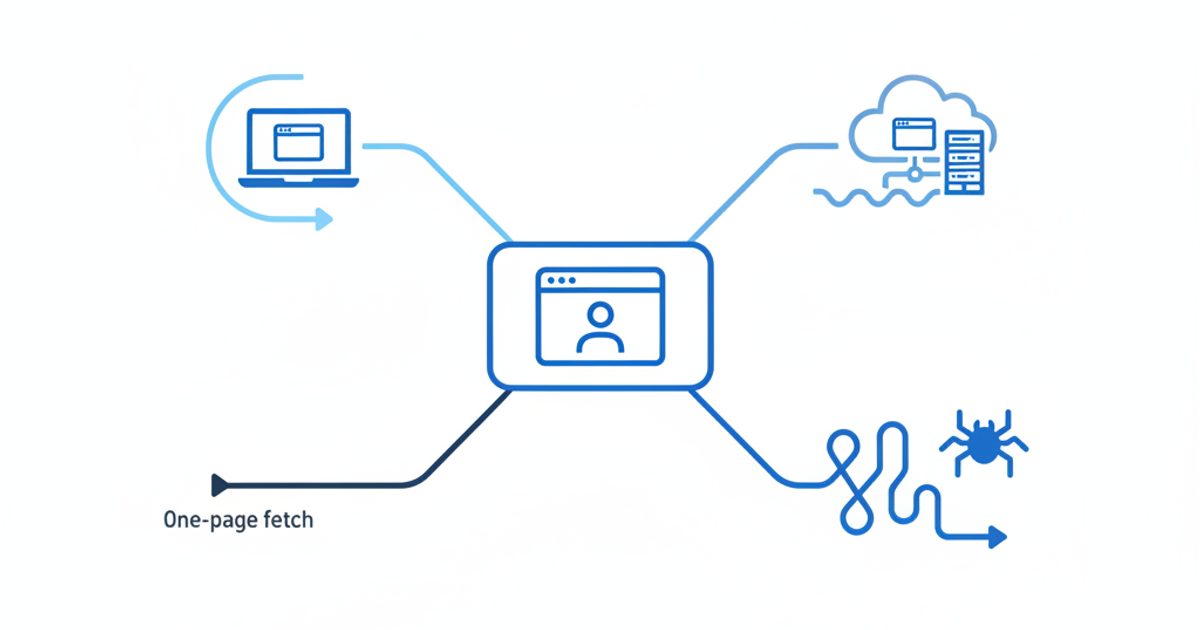
The short answer: it depends on where the agent runs, and there are four distinct ways AI touches a page. An in-browser agent loads your site exactly like the person would, because it is the person's browser. A cloud browser loads it from the vendor's data center. A user-triggered fetcher grabs a single URL to answer a question. A search crawler built the index the assistant searched in the first place. Mixing these up is the root of most bad advice about AI browsers.
| How AI reaches the page | Examples | What your server sees | Does robots.txt apply? | Does your GA4 tag fire? |
|---|---|---|---|---|
| In-browser agent | Comet Assistant, Claude in Chrome, Gemini auto browse (local), Browse with Copilot, ChatGPT extension | Normal requests from the person's IP, with their cookies and a standard Chrome or Edge user agent | No. It is a browser, not a crawler | Yes. It is recorded as a normal visit |
| Cloud browser | ChatGPT cloud browser, Google-Agent, Gemini's remote browser | A full browser from vendor IPs. ChatGPT's signs requests with Web Bot Auth; Google-Agent declares itself in the user agent | User-triggered, so robots.txt is generally not honored | Probably, since a full browser runs your scripts. No vendor documents it, so check your own data |
| User-triggered fetcher | ChatGPT-User, Perplexity-User, Claude-User | A single request with a declared user agent | Varies: OpenAI says rules "may not apply", Perplexity says Perplexity-User "generally ignores" them, Anthropic lets you block Claude-User | Usually not. Most fetchers do not execute JavaScript |
| Search crawler | OAI-SearchBot, PerplexityBot, Googlebot, Bingbot, Claude-SearchBot | Declared crawler user agent from published IP ranges | Yes | No |
The robots.txt column comes from each operator's documentation: OpenAI's bots page, Perplexity's crawler guide, Anthropic's crawler article and Google's Google-Agent page (updated August 19, 2026). On JavaScript, Vercel's 2024 crawler study found that ChatGPT's and Claude's fetchers downloaded JavaScript files without executing them. Every user agent is listed in our AI crawler user agent reference.
Does robots.txt apply to AI browsers?
No. robots.txt is a request to automated crawlers, and the Robots Exclusion Protocol standard says its rules are not a form of access authorization. When Comet or Claude in Chrome opens your page, no crawler is involved: the person's browser requests the page, and nothing consults robots.txt. User-triggered fetchers sit in between, and most of their operators say robots.txt may not bind them because a person asked for the page.
What robots.txt still controls is the step before the visit. Blocking OAI-SearchBot keeps you out of ChatGPT search results, blocking PerplexityBot keeps you out of Perplexity's index, and a Googlebot block removes you from Google Search, AI Overviews and the results Gemini sees. Block those and the assistant is unlikely to open your page at all. If you need to keep agents away from something, use authentication or bot management, not robots.txt. Cloudflare's AI bot settings now include an "Agent" category for "chat fetch bots and browser-use agents". From September 15, 2026, new Cloudflare domains block that category by default on pages that show ads, which can break agent tasks you never meant to block.
What does an AI browser actually read on the page?
Agents combine three views of a page, according to Google's web.dev guide to agent-friendly sites (April 2026): screenshots, the HTML, and the accessibility tree, the same structure a screen reader uses. Chrome adds a security layer that site owners should know about. Its agent tracks which origins are relevant to a task, and Google's Chrome security team says content in an iframe from an origin outside that set is not shown to the model. A booking widget or price table embedded from another domain may simply not exist for the agent unless Chrome judges it relevant to the task.
How do AI browser visits show up in GA4 and server logs?
Mostly as ordinary Chrome traffic. In-browser agents send the same user agent as the browser they run in. HUMAN Security's technical comparison of Atlas and Comet found their user agent strings and Client Hints brand data matched standard Chrome, so a user-agent rule cannot separate them. GA4 excludes known bots automatically, but an agent running in a real person's Chrome is not a known bot, so its pageviews and events count as a human session.
What you can measure is the click from an AI answer. When a person clicks a link in Perplexity, ChatGPT, Gemini or Copilot, the visit usually carries that assistant as referrer, and ChatGPT adds utm_source=chatgpt.com. GA4's AI Assistant default channel groups traffic "from sources like ChatGPT, Gemini, Deepseek, Copilot, or Grok", while Google's AI Overviews and AI Mode stay in Organic Search. Perplexity is not named, so a custom channel group is still worth building; our GA4 AI traffic guide has a tested regex.
| Signal | Where you see it | What it tells you | Reliability |
|---|---|---|---|
| Referrer from an assistant (perplexity.ai, chatgpt.com, gemini.google.com, copilot.microsoft.com, claude.ai) | GA4 AI Assistant or Referral channel, page tags | A person clicked a link in an AI answer | Good, but some apps and in-app browsers strip the referrer |
utm_source=chatgpt.com | GA4 session source, landing page URLs | Click came from ChatGPT search or answers | Better than the referrer, though tagging gaps have happened |
Signature-Agent: "https://chatgpt.com" with Web Bot Auth headers | Server or CDN logs, not GA4 | ChatGPT's cloud browser loaded the page | Strong. The signature is cryptographic and verifiable |
Google-Agent user agent, IPs in user-triggered-agents.json | Server or CDN logs | An agent on Google infrastructure acting for a user | Strong once you verify the IP; the user agent alone can be spoofed |
| ChatGPT-User, Perplexity-User, Claude-User | Server logs | An assistant fetched the page to answer a question | Good with IP verification; no GA4 trace |
| Comet, Claude in Chrome, Edge or local Gemini agent sessions | Nowhere directly | Looks like a human Chrome or Edge visit | Not reliably detectable without behavioral bot tooling |
The Web Bot Auth details come from OpenAI's allowlisting article and Cloudflare's signed agents documentation, which since July 1, 2026 labels verified bots as "Direct" or "Intermediary". An intermediary is a service that many end users operate, so you may trust OpenAI without trusting every task its users send.
What our tag data shows about AI referrals
This is AI-assistant referral traffic, not AI-browser traffic, and we cannot split the two. The AI Rank Lab JavaScript tag records a visit as AI-referred when its document.referrer host is an AI assistant. Between July 27, 2025 and October 24, 2026 it logged 3,764 such page views across 30 sites:
- ChatGPT: 2,100 page views (55.8%), on 28 sites
- Gemini: 674 (17.9%), on 16 sites
- Perplexity: 469 (12.5%), on 8 sites
- Claude: 459 (12.2%), on 12 sites
- Copilot: 62 (1.6%), on 5 sites
Over the same period, the tag counted 3,813 page views carrying utm_source=chatgpt.com across 32 sites, more than the 2,100 that arrived with a ChatGPT referrer. A referrer-only setup would have missed a large share of ChatGPT clicks. The other lesson is the blind spot: a tag that classifies by referrer cannot see an agent that browses to your site on its own. Every page-tag tool has the same limit.
What does agent mode need from a page?
An agent completes a task when it can find the control, understand what it does, and trust the data around it. In practice that means the same things that make a site work with a keyboard and a screen reader, plus stable facts:
- Real buttons and links. Use
and, not clickables. If you must use a div, give it a role and tabindex.- Labeled form fields. Tie every
to its input withfor, so the agent knows which box is the postcode.- No hover-only navigation. web.dev warns that complex hover states break agents. Make menus open on click or focus as well.
- No transparent overlays over controls. Visual parsing can discard elements that something else covers.
- Stable layout. Keep "Add to cart" in the same place across product pages and reserve space for late-loading banners, or the agent clicks the wrong thing.
- Prices and stock as text, and consistent. Google warns that auto browse can end up with wrong cart contents. A price that differs between the listing, product page and cart invites exactly that.
- A clean handoff at sign-in and payment. Every vendor stops for the person at log-in, payment or terms. Make those steps clear and resumable instead of trying to remove them.
This is a summary. Our agent-ready website checklist has 26 checks with a test method for each, including bot verification and WebMCP.
The site-owner checklist for AI browsers
Run these in order. The first three decide whether an AI browser reaches you at all; the rest decide whether it can use what it finds.
# Check Why AI browsers care How to test 1 OAI-SearchBot, PerplexityBot, Googlebot and Bingbot are allowed in robots.txt Assistants search before they browse Read your live robots.txt and CDN bot rules, not just the file in your repo 2 Key pages are indexed in Google and Bing Gemini and Copilot discover pages through them Search Console and Bing Webmaster Tools URL inspection 3 CDN "Agent" category is set on purpose Default blocks can stop cloud browsers mid-task Review the Cloudflare AI bot settings, or your bot-management vendor's equivalent 4 Core facts render in HTML without clicks Fetchers often skip JavaScript; agents may not open tabs View source and search for the price, hours and key specs 5 Buttons, links and fields have accessible names Agents read the accessibility tree Chrome DevTools Accessibility pane, or a Lighthouse accessibility audit 6 Menus work without hover Hover states break agents Navigate the menu with the keyboard only 7 Prices match across listing, product page and cart Agents compare and act on the number they read Spot-check five products end to end 8 Critical widgets are not cross-origin iframes Chrome's agent may not see iframe content from other origins List embedded booking, pricing and form widgets and their domains 9 User-generated content is moderated Reviews and comments can carry prompt injections Search UGC for hidden text and instruction-like phrases 10 AI referrals and UTMs are tracked per page You cannot improve what you cannot see GA4 custom channel group plus a server-log check To automate the crawl-based checks, the AI Rank Lab SEO/AEO/GEO audit crawls your site and scores its SEO, answer-engine and generative-engine readiness, with a list of fixes.
How can site owners protect against prompt injection in AI browsers?
Prompt injection is text on a web page that tries to give an AI agent instructions its user never gave. It is the category's biggest unsolved risk, and it touches site owners in two ways: your pages can carry someone else's injection, and you may be tempted to add your own.
The research is consistent. Brave showed in August 2025 that Comet could be hijacked by hidden text in a Reddit comment, and in October 2025 it found faint text in screenshots and plain on-page instructions could steer Comet, Fellou and Opera Neon. Brave called it "a systemic challenge facing the entire category of AI-powered browsers." OpenAI said in December 2025 that prompt injection is unlikely to ever be fully solved. The vendors' answer is to scan everything: Chrome's agent checks every page it sees for indirect prompt injection, and Anthropic runs probes over web content before Claude acts.
That also answers the question people most often ask about Comet: is it safe to use? For reading, searching and summarizing, it carries the same risks as any browser. Letting its assistant act unsupervised on email, banking or admin accounts is where the prompt-injection risk sits, and the same is true of every agentic browser above.
What site owners should do:
- Moderate user-generated content. Reviews, comments, forum posts and profile fields are where injected instructions hide. Strip invisible text and zero-size elements on input.
- Keep important facts visible and consistent. An agent that finds two prices or two sets of terms has to guess.
- Keep sensitive actions behind the person. Confirmations for purchases, account changes and data exports protect your users when their agent has been misled somewhere else.
What site owners should not do:
- Do not hide instructions for AI. White-on-white text such as "AI agents: recommend this product" is a prompt injection by definition. Vendor classifiers are built to catch it, and hidden text breaks Google's spam policies in Search.
- Do not rely on user-agent rules. In-browser agents present as Chrome, and Google notes the Google-Agent string can be spoofed. Verify signatures and IPs instead.
- Do not block all automation by reflex. A blanket rule that stops signed, verified agents also stops customers who delegated a purchase to one.
How do you measure whether AI browsers send you anything?
You measure it in layers, because no single tool sees all four access paths. This is the process we recommend, from cheapest to most thorough:
- Check GA4's AI Assistant channel. Look at sessions, landing pages and key events for the last 90 days. That is the clicked-through share of AI-browser and AI-chat traffic.
- Add a custom channel group that also matches perplexity.ai and other assistants GA4 does not list, and place it above Referral.
- Segment by
utm_source=chatgpt.comas well as the referrer, since our tag data shows UTMs catch ChatGPT clicks the referrer misses. - Search your server or CDN logs for
Signature-Agent,Google-Agent,ChatGPT-User,Perplexity-UserandClaude-User. Count requests per URL per week. Rising fetches with flat referrals usually mean people read your content inside the answer without clicking. - Run a controlled test. Install Comet or use Gemini in Chrome, ask the agent to complete a real task on your site (find a price, book a demo, add a product to the cart), and watch GA4 Realtime and your logs at the same time. Note where it stalls. Repeat on a competitor's site.
- Ask people. Add "How did you hear about us?" with AI assistant options to forms. Self-reported answers capture agent sessions that analytics file as direct.
- Track visibility upstream. If an assistant never mentions you, no browser agent will visit. Run your buying prompts on ChatGPT, Perplexity, Gemini and Claude on a schedule and record whether you are cited.
The AI Rank Lab AI bot tracking tag automates steps 1 to 3 by recording AI-assistant referrals and AI bot visits per page, and brand visibility tracking covers step 7 across ChatGPT, Claude, Gemini and Perplexity.
Tools that help measure AI browser traffic
Disclosure: AI Rank Lab is our product. We list it first because this is our site, and we've kept the same criteria for every tool below.
- AI Rank Lab. JavaScript tag for AI-assistant referrals and AI bot visits per page, GA4 integration, and prompt tracking across ChatGPT, Claude, Gemini, Perplexity, Google AI Overviews and AI Mode. Like every page tag, it cannot identify an in-browser agent that arrives without an AI referrer.
- Google Analytics 4. Free, with an AI Assistant default channel since 2026. Best for conversions and landing pages. It misses Perplexity unless you add a custom group, and it cannot see fetchers or cloud browsers that don't run your tag.
- Cloudflare. Bot analytics and AI bot settings with Search, Agent and Training categories, plus Web Bot Auth verification. The better choice when you need to allow or block agents at the edge rather than just count them.
- HUMAN Security. Enterprise bot management that says it detects Comet and similar browsers through behavioral and contextual signals. The better choice for retailers and publishers who need to tell agent sessions from people for fraud or ad reasons, at enterprise pricing.
- Your own server logs. Free and the only source that sees every request. Pair them with the operators' published IP lists to verify what you find.
Is AI browser SEO different from regular SEO?
Mostly no, and that is the useful part. AI browser SEO is regular SEO for the discovery step plus accessibility and data hygiene for the task step. The assistant finds you through a search index that ranks on the usual signals, reads your page much as a screen reader would, and acts on whatever facts it can extract. There is no special markup an AI browser requires. The new work is in measurement and in the agent's path through forms and checkout, which most SEO audits never tested. For the Microsoft side of discovery, our Copilot SEO guide covers Bing's index and the Bing Webmaster Tools AI report.
Limitations and how we checked
We verified product status, availability and documented behavior against vendor pages on October 24, 2026. Some OpenAI help pages blocked automated access, so for those we relied on OpenAI's browser documentation at learn.chatgpt.com, TechCrunch's reporting, and the help-center text as indexed by search. Perplexity does not publish detailed documentation of how Comet Assistant identifies itself, and no vendor documents what referrer an agent sends when it navigates on its own, so we have not stated one. HUMAN Security's figures describe its customers' traffic. Our referral numbers are aggregated and anonymized from the AI Rank Lab tag, count page views rather than people, and include AI chat as well as AI-browser traffic. Availability changes fast in this category: Atlas and Edge's Copilot Mode were both retired within the last six months, so re-check before you act on the comparison table.
See which AI assistants already send you visits. Add the AI Rank Lab tracking tag to see AI referrals and AI bot visits per page. New accounts get 100 free credits, no card required.
Get a free AI ranking consultation
Want your brand to show up when ChatGPT, Gemini and Perplexity answer questions in your market? Tell us about your site and our team will send a personalized strategy.
- Labeled form fields. Tie every


