


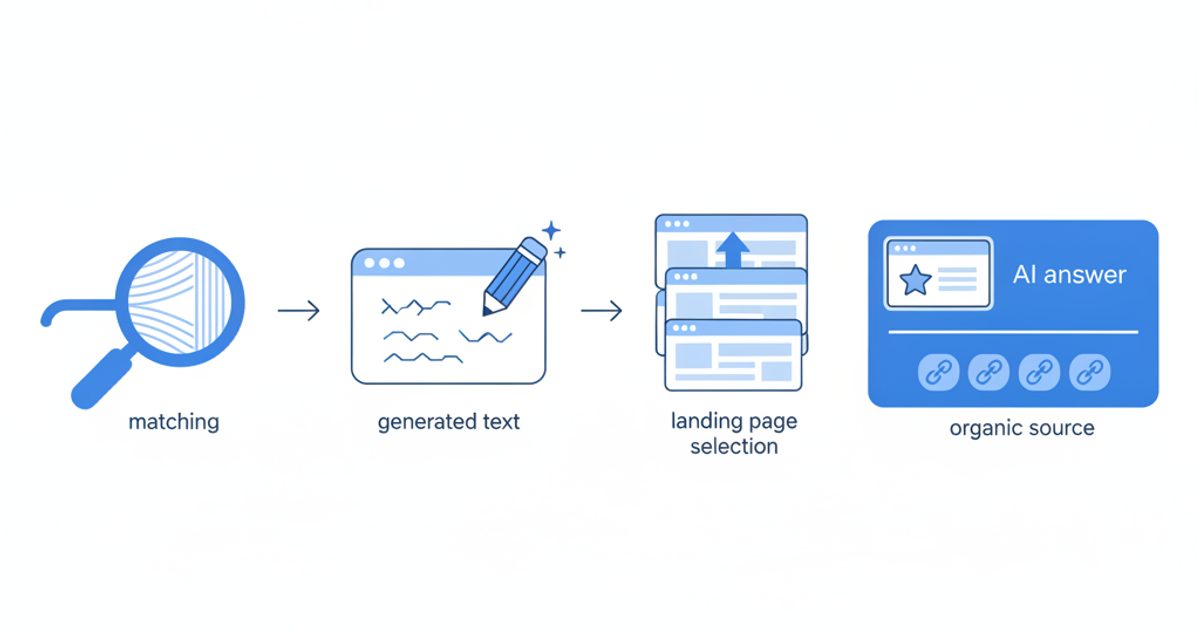
AI Max for Search is a one-click set of Google AI features that sits inside an existing Search campaign: it expands which searches your ads match (broad match plus "keywordless" matching from your landing pages and assets), rewrites headlines and descriptions to fit each query, and can send the click to a different page on your site. It is not a new campaign type, it needs conversion-based Smart Bidding to work properly, and it is one of the ways (not the only way) a Search campaign becomes eligible for ads inside Google AI Overviews and AI Mode.
This guide covers what each feature does according to Google's own documentation, the exact menu path to switch it on or test it, the controls that keep it in check, what Google claims versus what independent tests found (labelled separately), a turn-on, test or skip table by account type, and why paying for a slot inside an AI answer does not make the AI cite you. Every Google Ads fact below was checked against Google Ads Help and Google's announcements on October 24, 2026.
Key takeaways
- AI Max bundles three features: search term matching, text customization and final URL expansion. You can turn each on or off, and search term matching can be switched off per ad group.
- It is an optimization layer, not a campaign type. It needs conversion-based Smart Bidding; under Manual CPC, search term matching does not work.
- Google's own figures: 14% more conversions or conversion value at a similar CPA/ROAS (non-retail, Google internal data). An independent analysis of 250+ campaigns found a median +13% conversion value but a median +16% CPA, with ROAS swinging from +42% to -35%.
- Ads inside AI Overviews and AI Mode need AI-powered targeting: broad match, AI Max, Performance Max, Shopping or Dynamic Search Ads. AI Max is one route in, not the only one, and there is no opt-out or separate reporting.
- Deadlines: automatically created assets and campaign-level broad match settings upgrade to AI Max from September 2026; Dynamic Search Ads auto-migrate from February 2027.
- Buying the ad does not buy the citation. In SE Ranking's US study, advertisers' domains were among AI Mode's cited sources for the same keyword only 11.53% of the time.
What is AI Max for Search campaigns?
AI Max for Search campaigns is Google's name for "a set of targeting and creative enhancements for Search campaigns, powered by Google AI," per Google Ads Help. Google's setup guide is explicit that it is "not a new campaign type but an optimization layer within existing Search campaigns." You keep your keywords, ad groups, negatives and budgets; AI Max adds automated reach and creative on top of them.
The timeline matters because many ranking articles are stale on it:
- May 6, 2025: Google announced AI Max as a beta rolling out to all advertisers globally (Google Ads & Commerce blog).
- April 15, 2026: Google declared AI Max out of beta and announced that Dynamic Search Ads (DSA), automatically created assets (ACA) and the campaign-level broad match setting would all be upgraded into it (Google announcement).
- June 11, 2026: Google delayed the DSA automigration to February 2027 and restored DSA campaign creation, while keeping the September 2026 upgrade for ACA and campaign-level broad match (Google Ads Developer Blog).
- August 20, 2026: Google added brand and location controls inside AI Max experiments and announced multi-campaign budget and ROI tests "rolling out in September" (Google Ads & Commerce blog).
What are the three features of AI Max?
AI Max has three features: search term matching decides which searches you show on, text customization decides what the ad says, and final URL expansion decides where the click lands. Here is how each works, from Google's How AI Max for Search campaigns works page.
1. Search term matching
Search term matching expands reach beyond your keyword list using broad match, asset-based and landing page-based matching. The keywordless part "will learn from your current keywords, creatives and URLs" to decide which searches to enter. It turns on with AI Max at campaign level and can be switched off for individual ad groups. In the search terms report, these extra queries show up with the match type "AI Max," with a Source column saying whether they came from broad match expansion or keywordless matching.
2. Text customization
Text customization writes headlines and descriptions from your existing ads, landing page copy and assets using generative AI. It is the feature formerly called automatically created assets. Google's FAQ says the customization is fully automated, so you cannot choose which phrasing or offer it uses, although you can remove generated assets after the fact.
3. Final URL expansion
Final URL expansion sends the click to a different page on your site when Google predicts it fits the query better. Google says it "will only send traffic to URLs that are query relevant and themed to your ad group." It requires text customization (so the copy matches the new page), and when both are on, pinned responsive search ad assets are not honored.
How is AI Max different from broad match?
Broad match is one ingredient of AI Max; AI Max adds keywordless matching, rewritten ad copy and landing page selection on top. With AI Max on, your keywords are effectively matched as broad, and Google's docs warn that "broad keywords are not treated as exact match keywords in prioritization." If you depend on exact-match prioritization, Google recommends adding exact-match copies of those keywords. Independent data shows the expansion bites into exact match: Smarter Ecommerce (smec) found that by July 2026 roughly 29% of exact-match impressions in its EMEA ecommerce sample (383 million impressions) were being expanded by AI Max search term matching, as reported by Relevant Audience.
| Option | What it changes | Creative | Landing page | Status (Oct 2026) |
|---|---|---|---|---|
| Broad match keywords | Matches related searches to your keywords | Your ads | Your final URL | Available; campaign-level broad match setting upgrades to AI Max from September 2026 |
| AI Max for Search | Broad match plus keywordless matching from your pages and assets | Your ads plus generated text | Your URL or a Google-selected page | Out of beta since April 2026 |
| Dynamic Search Ads | Matches searches to your site content, no keywords | Generated headline | Google-selected page | Being retired; new DSA creation ends January 2027, automigration from February 2027 |
| Performance Max | All Google channels, keywordless | Generated from asset groups | Final URL expansion available | Available; when a query matches both PMax and AI Max, the higher Ad Rank serves |
What are the requirements for AI Max to work?
AI Max works best on a campaign with reliable conversion tracking, a conversion-based Smart Bidding strategy and a budget that is not capped. Google's setup guide and FAQ list these conditions:
- Smart Bidding. All three features "need a conversion-based Smart Bidding strategy to work effectively." Under Manual CPC, search term matching does not work at all.
- Budget headroom. "AI Max won't be effective if campaigns are limited by budget," and Google shows an alert if you enable it on a budget-limited campaign.
- Working tracking templates. Final URL expansion creates dynamic landing pages. A tracking template without
{lpurl}, or with{lpurl}inside a parameter value, can send those clicks to 404 pages. Google tells you to test this before enabling. - Feature dependencies. Final URL expansion requires text customization, and URL exclusions require both to be on. Turning off text customization also turns off final URL expansion.
- No pinning dependency. If your compliance depends on pinned headlines, do not run text customization plus final URL expansion; pinning is not respected.
Agencies add a volume floor. Adalysis, for example, suggests testing only in non-brand campaigns with at least 30 conversions a month (Adalysis, August 2026). That is an agency rule of thumb, not a Google requirement.
How do I turn on AI Max in Google Ads?
On an existing Search campaign, AI Max is a toggle in campaign settings; on a new Search campaign, it is selected by default. These are the paths in Google's setup guide as of October 24, 2026.
Existing Search campaign
- In Google Ads, open Campaigns and go to Settings.
- Select the Search campaign you want to change.
- Select AI Max in the section menu.
- Toggle AI Max on, then choose which features to keep: search term matching, text customization, final URL expansion.
- Add brand controls, locations of interest and URL rules (next section) before you save, not after the first week of spend.
Several campaigns at once
- In Settings, tick the campaigns, then select Edit.
- Choose Change AI Max settings (or Change asset optimization settings), make the change and select Apply.
New Search campaign
Select Create, then Campaign, and build a Search campaign. AI Max is on by default; ad group settings sit in the Keywords and ads step. If you do not want it, switch it off here.
Per ad group
Go to Ad groups, select the ad group, open Search term matching and toggle it. This only works once AI Max is on at campaign level.
Test it as an experiment instead
The safer route is an AI Max experiment, which splits one campaign into an arm with AI Max off and an arm with it on. Per Google's AI Max experiments page:
- Open Experiments in the Campaigns menu, select the plus button, then Campaign features and settings.
- Select AI Max for Search campaigns and Continue.
- Choose your campaigns with Select campaigns.
- Set the arms, dates, name and auto-apply option. With one campaign selected, you can also set asset optimization and brand settings, which apply to both arms.
- Select Create, then read results in the experiment summary on the Experiments tab.
You cannot create an AI Max experiment this way if the campaign already has text customization on, targets the Display Network, uses a portfolio bid strategy, a shared budget or bidding exploration, or already has an active experiment. Eligible campaigns may also see a one-click 50/50 experiment on the Recommendations page.
What controls does AI Max give advertisers?
AI Max's guardrails are brand controls, location controls, URL rules, negatives and asset removal, and each works at a specific level. The table maps them from Google's documentation.
| Control | Level | What it does | When to use it |
|---|---|---|---|
| Brand inclusions | Campaign and ad group (ad group overrides campaign) | Limits matching to searches that mention the brands you list | Brand campaigns, reseller campaigns tied to specific brands |
| Brand exclusions | Campaign | Keeps ads off searches for brands you list, including competitors or your own | Non-brand campaigns that should not cannibalize brand traffic |
| Locations of interest | Ad group (exclusive to AI Max) | Targets people by the place they search about, including in keywordless matches | Travel, real estate, multi-location services |
| URL inclusions | Ad group | Adds pages final URL expansion did not pick up | New or deep pages you want eligible |
| URL exclusions | Campaign | Stops specific pages being used as landing pages | Blog, careers, login, cart, policy and out-of-stock pages |
| Negative keywords and negative URLs | Campaign or ad group | Respected by AI Max; addable straight from the search terms report | Irrelevant or unprofitable queries found in review |
| Generated asset removal | Ad and campaign asset reports | Removes text Google wrote ("Added by: Google AI"); bulk removal needs Editor or the API | Off-brand or non-compliant copy |
| Feature toggles | Campaign (search term matching also per ad group) | Run only the features you trust | Lead gen accounts that want reach without landing page changes |
One trap: turning AI Max off disables all of its features, including brand exclusions. Google says turning it back on restores your previous settings, but in the meantime your brand guardrails are gone.
Ads in AI Overviews and AI Mode: where they appear and who is eligible
Ads can appear above, below or inside AI Overviews, and below or integrated into AI Mode answers. Getting into the slots inside those answers requires AI-powered targeting, which is the main reason AI Max comes up in AI search conversations.
How do ads appear in AI Overviews?
Google's About ads and AI Overviews page (checked October 24, 2026) says:
- Ads can show above or below an AI Overview in all 200+ markets where AI Overviews are available.
- Ads within the AI Overview run in English on mobile and desktop in Australia, Canada, India, Indonesia, Kenya, Malaysia, New Zealand, Nigeria, Pakistan, the Philippines, Singapore and the US.
- Eligible: Text and Shopping ads from Search, Shopping and Performance Max campaigns. To match, Google "requires AI-powered targeting solutions like broad match on Search," keywordless targeting (AI Max, Performance Max, Shopping) or Dynamic Search Ads.
- Ads are matched on both the user's query and the content of the AI Overview.
- No ads inside AI Overviews for sensitive verticals such as adult, alcohol, gambling, finance, healthcare and politics.
- You cannot opt out, cannot target the placement directly, and get no segmented reporting. These ads count as "Top ads."
How do ads appear in AI Mode?
Google said in May 2025 that "where relevant, ads may appear below and integrated into AI Mode responses," with the same eligibility pool: Performance Max, Shopping and Search campaigns with broad match, "including AI Max for Search campaigns" (Google). At Google Marketing Live on May 20, 2026, Google announced it is testing two Gemini-built formats in AI Mode, Conversational Discovery ads and Highlighted Answers, both labelled "Sponsored" (Google). Google's help pages did not list a country set for AI Mode ads when we checked; Adthena's August 2026 analysis describes the US as live with India named in the rollout, and no opt-in, opt-out or separate reporting (Adthena). On October 19, 2026, Search Engine Roundtable reported Google is also testing ads for AI Mode users who connected apps through Personal Intelligence.
How often do ads actually show in AI answers?
It depends heavily on surface and sample, so treat each figure as one measurement:
- AI Mode, commercial queries: SE Ranking checked 50,032 US commercial keywords on June 30, 2026 and found text ads on 29.45% of them; 71.1% of those showed two ads, and ad presence rose to 53.56% for keywords with CPCs above $10 (SE Ranking, July 2026).
- AI Mode, broader query mix: Adthena reported ads on 5.8% of about 850,000 tracked US queries in Q2 2026.
- Inside AI Overviews: Adthena's June 2026 data put the US rate at 0.16%, or 16 in every 10,000 AI Overviews carrying a paid placement (PPC Land).
| Ads in AI Overviews | Ads in AI Mode | |
|---|---|---|
| Placement | Above, below or within the Overview | Below or integrated into the answer; new formats in testing |
| Eligible campaigns | Search (broad match, AI Max, DSA), Shopping, Performance Max | Search with broad match including AI Max, Shopping, Performance Max |
| Markets for in-answer ads | 12 English-language countries (listed above) | US live per independent trackers; Google lists no country set in help docs |
| Opt-out | No | No (per Adthena) |
| Separate reporting | No; counted as Top ads | No |
| Excluded | Sensitive verticals | Sensitive verticals: few ads in tracked samples (healthcare 2.64% in SE Ranking's data) |
For the organic side of these two surfaces and how they differ, see our AI Mode vs AI Overviews comparison.
Does AI Max actually improve results?
Google's own numbers say yes; independent data says AI Max usually adds volume but often at a higher cost per conversion, with wide variation by account. The table separates the two, with each figure's baseline, because most articles quote Google's 14% without its conditions.
| Claim | Source type | Figure | Conditions and caveats |
|---|---|---|---|
| AI Max launch claim | Google-reported | +14% conversions or conversion value at similar CPA/ROAS | Google internal data, 2025, non-retail advertisers |
| Exact and phrase-heavy campaigns | Google-reported | +27% | Campaigns with more than 70% of conversions from exact or phrase match, non-retail |
| Full feature suite | Google-reported | +7% conversions or value at similar CPA/ROAS | Versus search term matching alone; Google internal data, 2026, non-retail |
| Launch case studies | Google-reported | L'Oréal: 2x conversion rate, 31% lower cost per conversion; MyConnect: 16% more leads, 13% lower CPA | Selected by Google; no sample or test design published |
| smec, 250+ Search campaigns | Independent | Median +13% conversion value, median +16% CPA; ROAS from +42% to -35%; only 22% of campaigns near ROAS target | Ecommerce-heavy dataset; time period not stated (SEJ, March 2026) |
| smec, retail campaigns | Independent | AI Max conversions at roughly 35% lower ROAS than other match types in the same campaigns | 250+ retail campaigns, November 2025; AI Max active in 12% of 600+ accounts sampled (PPC Land) |
| Single-advertiser test | Independent | $100.37 per conversion on AI Max vs $43.97 on phrase match | One account, four months (Xavier Mantica); a reminder that averages hide losers |
Three things reconcile the gap. First, Google's headline figures exclude retail, and Google has said it gives no performance expectation for retail campaigns, which is exactly where most independent data comes from. Second, Google's 7% figure is measured against search term matching alone, not against a campaign without AI Max. Third, smec found AI Max expansion overlapping existing broad match queries in 49% and 63% of cases in two accounts, so some "new" conversions are traffic you already had, relabelled. The only way to know your number is a controlled experiment in your own account.
Should I turn on AI Max? A decision table by account type
Turn it on as an experiment if you have clean conversion data, Smart Bidding and spare budget; skip it if you run Manual CPC, low conversion volume or strict copy rules. This table is our synthesis of Google's requirements and the independent results above.
| Account type | Verdict | Why | Settings to start with |
|---|---|---|---|
| Non-retail lead gen built mostly on exact and phrase match, 30+ conversions a month, Smart Bidding | Test now | The group Google's 27% figure is based on; most upside if the queries you miss are real demand | Search term matching on; final URL expansion off until you have checked which pages it picks; brand exclusions set |
| Already broad match with Smart Bidding | Test, expect less | You already have most of the reach; Google's own full-suite claim is +7% | Test text customization and URL expansion as the variable |
| Ecommerce running Shopping and Performance Max | Test cautiously | Independent retail data shows higher CPA and lower ROAS; overlap with PMax is decided by Ad Rank | Small budget share, tight URL exclusions (cart, out-of-stock), watch ROAS by match source |
| Accounts that rely on DSA | Migrate on your terms before February 2027 | DSA automigrates from February 2027; moving early lets you choose settings | Use Google's upgrade tool, keep URL rules, compare against DSA history |
| Using automatically created assets or campaign-level broad match | Review now | These began auto-upgrading to AI Max in September 2026; check what got switched on | Audit each campaign's AI Max panel and set brand and URL controls |
| Manual CPC, under ~30 conversions a month, or budget-limited | Skip for now | Search term matching does not work under Manual CPC and AI Max underperforms when budget-capped | Fix conversion tracking and bidding first |
| Regulated copy (finance, health, legal) or reliance on pinned headlines | Skip text features | Generated copy cannot be pre-approved and pinning is not honored with URL expansion | If testing, search term matching only, with tight negatives |
| Brand campaigns | Usually skip | Little missed demand to find; brand searches rarely trigger AI answer ads in Adthena's sample | If on, use brand inclusions so matching stays on your brand |
How do I measure AI Max performance?
Measure AI Max in three reports plus an experiment, and judge it on incremental profit, not on conversions credited to the "AI Max" label. Google's AI Max reporting page lists what to look at:
- Search terms report. Filter Match type = "AI Max" and add the Source column to split broad match expansion from keywordless matches. Google warns the filter can undercount because it leaves out "Other search terms." The Search terms and ad combinations view shows each query with the headline and landing page that served, and you can add negative keywords or negative URLs directly from it.
- Keywords report. Two summary rows, "Total: AI Max expanded matches" and "Total: AI Max landing page matches," show AI Max's total contribution.
- Landing pages report. The "Selected by" column shows which pages AI Max chose. Compare their conversion rate with your own final URLs and exclude the weak ones.
- Asset reports. Text Google wrote is labelled "Added by: Google AI." Compare it with your own assets and remove what is off-brand.
- Experiment summary. Compare total conversions, CPA or ROAS between arms over the full test. Google gives no recommended test length; PPC.io, for example, suggests about eight weeks and waiting at least two weeks before adding negatives (PPC.io, September 2026).
Two measurement limits to accept: ads served inside AI Overviews or AI Mode are not reported separately (they are blended into Top ads), and Google's API exposes the match source as a segment for teams that pull reports programmatically. If you need a view of the AI answer itself, you have to observe it from outside Google Ads.
Paid vs organic: why organic AI visibility still matters
An ad inside an AI answer is a paid placement next to the answer; it does not make the AI cite or recommend you. SE Ranking's study of 50,032 US commercial keywords found that advertisers' domains were among AI Mode's cited sources for the same keyword 11.53% of the time, and the exact advertised URL only 1.95% of the time. Only 15.35% of advertiser domains also ranked organically for the keywords they were advertising on, and the study found no clear citation advantage from buying ads.
That matters for three reasons:
- Coverage. Even in SE Ranking's commercial-only sample, about 70% of AI Mode responses carried no text ad. On informational and early research queries, and in sensitive verticals, the organic answer is the only placement there is.
- Trust and position. The answer text and its cited sources shape the shortlist before the user reaches a sponsored card. If the AI recommends three competitors and your ad sits below, you are paying to argue with the answer.
- Clicks. AI Overviews already reduce clicks to classic results; our AI Overviews CTR data covers that effect. Being cited is how you stay in the answer when the click does not happen, which is the core of a zero-click search strategy.
A workflow to line up paid and organic AI visibility
- Export your top 50 to 100 spend queries from the search terms report, including the AI Max rows.
- Check each query in Google AI Overviews and AI Mode: is there an AI answer, and is your domain cited? AI Rank Lab's AI Overview tracker and AI Mode tracker run these checks for the queries you choose and store each run, so you can compare later runs against this baseline. (Disclosure: AI Rank Lab is our product. We mention it because this is our site; the same check can be done by hand in a clean browser.)
- Sort queries into four groups: paid and cited, paid only, cited only, neither.
- For "paid only" queries, find the pages the AI does cite with the citation tracker or by hand, and close the content gap on your own page.
- For "cited only" queries, test whether the ad adds anything, or whether budget is better spent where you are absent.
- Track organic AI clicks in Search Console's Generative AI performance report, which our Search Console guide explains, since Google Ads will not separate them for you.
If you also buy placements in ChatGPT, the same logic applies; our ChatGPT ads guide covers how those ads sit beside organic answers.
What happens to Dynamic Search Ads with AI Max?
Dynamic Search Ads are being folded into AI Max: new DSA campaign creation ends in January 2027 and remaining DSA campaigns automatically migrate from February 2027, according to the June 11, 2026 Google Ads Developer Blog notice and Google's updated reporting docs. When DSA converts, Google maps it to standard ad groups with all three AI Max features enabled and legacy URL controls preserved. Campaigns using automatically created assets or the campaign-level broad match setting were already scheduled to upgrade from September 2026, with search term matching on by default. If you programmatically create DSA campaigns through the Google Ads API, update those workflows before January 2027.
Limitations of this guide
Google changes AI Max controls, country lists and labels often, and several help pages carry no visible last-updated date, so re-check the linked help pages before making account changes. Independent results here come from agency and tool datasets that skew toward ecommerce and do not all publish full methodology; we have stated sample sizes and caveats where the source did. We have no first-party Google Ads data of our own in this article, and the decision table is a synthesis, not a test we ran.
If you want to see whether you are cited organically for the queries you are paying for, run your top spend queries through AI Rank Lab's AI Overview and AI Mode trackers; signup includes 100 free credits, no card needed.
Get a free AI ranking consultation
Want your brand to show up when ChatGPT, Gemini and Perplexity answer questions in your market? Tell us about your site and our team will send a personalized strategy.


