


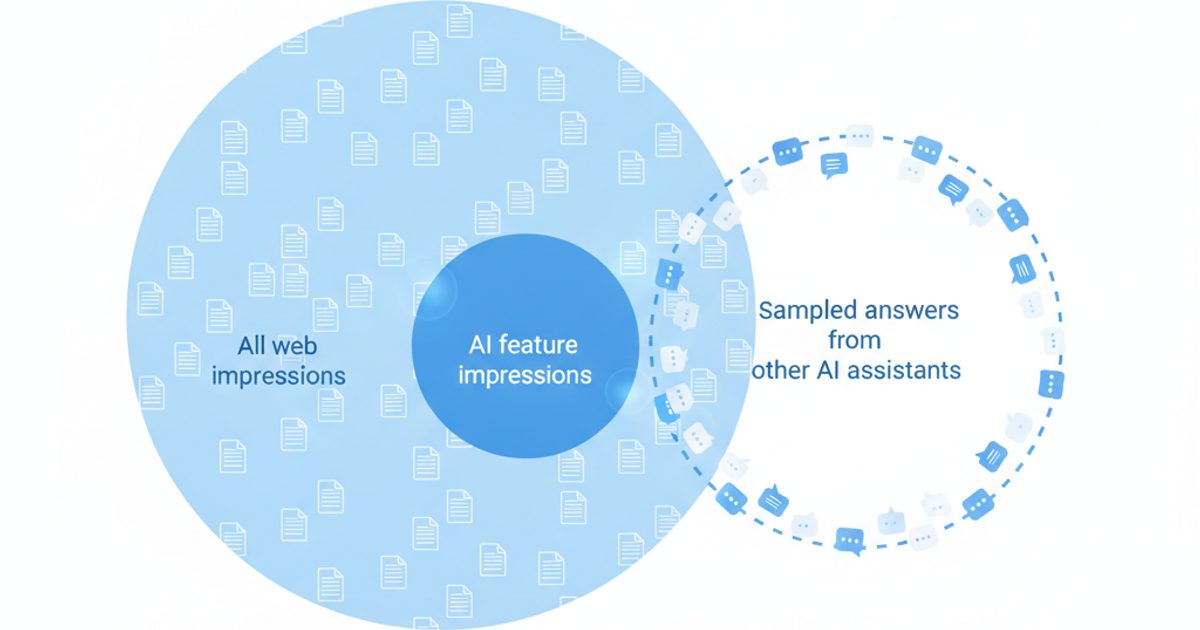
The Search Console generative AI report (Google calls it the Generative AI performance report) shows how often links to your site appeared in AI Overviews and AI Mode on Google Search, broken down by page, country, device and date. It launched on June 3, 2026, reached all websites worldwide on August 31, 2026, and reports impressions only: no clicks, no queries, no position. Those impressions are not new traffic. They are already counted inside the Web search type of your main Performance report, and this report isolates them.
This guide covers where to find the report, every metric and dimension it has, exactly how Google counts an AI impression and click, what the report cannot tell you, five analyses to run with step-by-step instructions, and how to combine it with GA4 and third-party prompt tracking without double counting. Every product detail below was checked against Google's own documentation on October 18, 2026.
Key takeaways
- There are two reports: one for Search (AI Overviews and AI Mode combined) and one for Discover's generative AI features. Both show impressions only.
- Generative AI impressions are a subset of your Web search impressions. Never add the two together; divide them to get an AI impression share.
- AI Overview and AI Mode clicks are counted, but only inside your Web totals in Search Console and inside Organic Search in GA4. No Google tool separates them today.
- The report has no query dimension and no AI Overviews vs AI Mode split, and as of October 18, 2026 its data is not exposed in the Search Console API or the BigQuery bulk export.
- A web multimodal search type filter (Lens, Circle to Search, image uploads) was added to the report on September 24, 2026.
- Search Console is Google's census of your impressions on Google. Prompt tracking is a sample of answers across ChatGPT, Claude, Gemini and Perplexity. You need both to answer different questions.
What is the Search Console generative AI report?
It is a dedicated view inside Google Search Console that counts how many times links to your site were shown to users inside Google's generative AI features. Google's help center page for the Search version lists exactly two features it covers today, AI Overviews and AI Mode, and says Google expects to update that list over time. A separate Discover version covers generative AI features in Google Discover.
Google's own framing in the launch post on the Search Central blog is precise: the data "is included in the overall performance report," and the new report is "a separate view dedicated to visibility from generative AI features." In other words, nothing you see here is extra reach. It is a slice of numbers you already had, finally labeled.
When did it launch, and does every site have it?
The rollout happened in four steps, each documented by Google:
- January 28, 2026: after the UK Competition and Markets Authority opened a consultation, Google said it was exploring controls to let sites opt out of Search generative AI features.
- June 3, 2026: Google announced the reports and an opt-out control together, starting with "a subset of website owners in the UK."
- August 31, 2026: a note added to the launch post and both help pages says the insights have been rolled out "to all websites worldwide."
- September 24, 2026: Google added web multimodal reporting to both the Performance report and the Generative AI report.
Much of the coverage that ranks for this topic was written during the UK-only test and still describes a limited rollout. That is out of date. If your property does not show the report now, the cause is almost always one of the reasons in the next section.
Where do you find the generative AI report in Search Console?
It sits with the other Performance reports in Search Console's left-hand navigation, one entry for Search and one for Discover. You can also open it directly:
- Sign in to Search Console and select the property you want (a Domain property covers every subdomain and protocol, so it gives the fullest picture).
- Open the Search version at
search.google.com/search-console/performance/search-analytics/ai, the link Google's help center uses. - For Discover, open
search.google.com/search-console/performance/discover/ai. - Choose a date range, then pick a dimension tab above the table: Pages, Countries, Devices or Dates.
- Use the search type filter at the top to switch between Web: text-based and Web: multimodal.
Why can't I see the report for my site?
Google's help page gives one main reason for the Search report: your site "hasn't received enough impressions in generative AI features on Google Search." Two others follow from the documentation:
- The property is excluded. If you, or the owner of a parent property, switched the Search generative AI control to exclude, you receive no impressions from these features, so there is nothing to report.
- Discover is still rolling out. The Discover help page still says "not all properties have access to the report, as we're rolling out over time." The Search page no longer says that.
What metrics and dimensions does the report show?
One metric, impressions, and four dimensions on Search (three on Discover). Google defines an impression here as "how many times links to your site were shown to a user in a generative AI feature on Google Search." The table below compares the two versions using Google's own definitions, including the details that differ between them and that most write-ups skip.
| Feature | Generative AI report (Search) | Generative AI report (Discover) |
|---|---|---|
| Surfaces covered | AI Overviews and AI Mode, combined | Generative AI features in Discover |
| Metrics | Impressions only | Impressions only |
| Dimensions | Pages, Countries, Devices, Dates | Pages, Countries, Dates (no device) |
| What "Page" means | Final URL linked by the AI feature after redirects, mostly assigned to the canonical URL | The canonical page that served as the source of the information, not the landing page |
| Country means | Where the search originated | Where the content was viewed |
| Chart aggregation | By property: two of your links in one AI feature count as one impression | By page: each result counts separately |
| Search type filter | Web: text-based, Web: multimodal | Not applicable |
| Time zone and granularity | Pacific Time; daily, weekly, monthly, plus hourly in the 24-hour view | Pacific Time; daily values below a threshold may be hidden on the chart but stay in totals |
| Table limit | 1,000 rows | 1,000 rows |
| Export | Chart and table; "~" and "-" become zeros | Chart and table; same rule |
Does the report separate AI Overviews from AI Mode?
No. Google's documentation describes a single impressions count for "the following generative AI capabilities," listing AI Overviews and AI Mode, and offers no filter or dimension to tell them apart. That matters because the two behave differently: Google's AI features documentation says they "may use different models and techniques, so the set of responses and links they show will vary," and that AI Overviews often don't trigger at all. If you need the split, you have to observe the result pages yourself.
What does the multimodal filter add?
Since September 24, 2026 you can filter the report to Web: multimodal, which Google defines as searches "using images (such as with a smartphone camera)," including Google Lens, Circle to Search on Android, uploaded images and Chrome image search. Because these searches start from an image rather than typed text, Google notes there is no query data for them even in the main Performance report. For retail, food, travel and how-to sites with strong imagery, this filter shows whether AI features are surfacing your pages for visual searches, a segment none of the earlier guides cover.
What counts as an AI impression, click and position?
Google applies its standard Search Console counting rules to AI features, with a few specific twists documented on its page about impressions, position and clicks. In plain terms: an impression is a link to your site shown in an AI Overview or AI Mode response; a click on that link is a real click, but it is reported only in the main Performance report, mixed in with every other Web click.
| What happens on Google | Generative AI report | Main Performance report (Web) |
|---|---|---|
| A link to your page appears in an AI Overview | 1 impression | 1 impression (the same one) |
| Two of your URLs appear in the same AI Overview | Chart: 1 impression for the property. Pages table: 1 per URL | Same rule: property vs page aggregation |
| A user clicks your link in an AI Overview or AI Mode | Not shown | Counted as a click, not separable from other Web clicks |
| Position of a link inside an AI Overview | Not shown | The AI Overview occupies one position; every link in it gets that position |
| Position inside AI Mode | Not shown | Same methodology as a normal results page |
| A user asks a follow-up question in AI Mode | Counted as a new query | Counted as a new query |
| Your property is excluded via the Search generative AI control | No impressions | No impressions or traffic from these features |
The follow-up rule is worth knowing. Google says that when someone asks a follow-up inside AI Mode, "they are essentially performing a new query," and all impressions, positions and clicks in the new response belong to that new query. Combined with AI Mode's habit of splitting a question into subtopics (Google's own help text says it "searches for each one simultaneously," the mechanism explained in our guide to query fan-out), one conversation can produce several impressions for the same page.
Why don't the page rows add up to the chart total?
Because the chart and table aggregate differently. On the Search report the chart counts by property, so two of your links in one AI Overview count once, while the Pages table counts each URL. Google's data aggregation documentation also notes the table caps at 1,000 rows, so long-tail pages appear in the chart total but not the table. Pick one basis for any calculation and stay on it.
How does it compare with the main Performance report?
The generative AI report is a filtered view of the Performance report's Web search type, with fewer metrics and no queries. Google's help page states it directly: the report "includes data from the Web search type in the Performance report (Search results)." Three rules follow:
- Never add the numbers. Adding generative AI impressions to Web impressions double counts every AI impression.
- Divide them instead. AI impressions divided by Web impressions, for the same pages, dates and search type, gives you the share of your Google visibility that came through AI features.
- Treat Web averages as blended. Your Web clicks, CTR and average position already include AI feature activity. A falling CTR on a page with rising AI impressions is a hint that AI features are answering the query on the results page, not proof.
If you already analyze Search Console with AI tools, keep in mind that the Performance data they read is this blended Web data. Our guide to Search Console AI analysis covers what those Web-level diagnostics can and cannot catch.
What are the report's limitations?
The report answers "was I shown?" and almost nothing else. Know these limits before you put a number from it in front of a client or a board:
- Impressions only. No clicks, CTR or position. Google says it plans to add "additional metrics over time," with no dates given.
- No queries. You see which pages were shown, never which searches triggered them.
- No surface split. AI Overviews and AI Mode are combined.
- No API or warehouse access, as of October 18, 2026. The Search Analytics API's
searchanalytics.queryreference lists only web, image, video, news, googleNews and discover as types, and the BigQuery bulk export'ssearch_typefield lists the same six. Neither has a generative AI value, so pipelines and AI agents connected to Search Console (see our guide to connecting an AI agent to Search Console) cannot read this report. Export it manually on a fixed schedule. - Short history. Google does not document a start date for the data. Check the earliest date in your own chart before comparing periods, and never compare a short AI window with a longer Web window.
- Shown, not earned. An impression requires the link to be displayed to a user. A page that would be cited in a collapsed or unseen part of a response may not register.
- Google only. Nothing here covers ChatGPT, Claude, Perplexity, Copilot or the Gemini app.
- Thresholds. Sites with few AI impressions get no report, and rare rows can show "~" in comparisons.
Five analyses to run with the generative AI report
Each analysis below uses only data the two reports actually provide, and each states what it can and cannot prove. All of them start with the same habit: export both reports for identical dates and the same search type, and keep the files with the date in the name, because there is no API to backfill from later.
1. Calculate AI impression share by page
This tells you which pages Google's AI features lean on, and which pages rank in classic results but are rarely shown in AI responses.
- Choose a closed date range that starts on or after the first day with data in the generative AI chart, for example the last 28 full days.
- In the generative AI report, set the search type to Web: text-based, open the Pages tab and export.
- In the Performance report (Search results), set the same dates and the same search type, open the Pages tab, select Impressions and export.
- Join the two files on URL. Both tables are aggregated by page, so the ratio is like for like.
- Compute AI share = AI impressions / Web impressions for each URL.
- Sort by Web impressions. Pages with high Web impressions and near-zero AI share are your candidates for content work; pages with high AI share are your AI-exposed assets.
On sites with more than 1,000 pages getting impressions, repeat the export per folder with a URL filter (for example, URLs containing /blog/) so the row limit does not silently drop pages.
2. Measure how concentrated your AI visibility is
AI exposure often rests on far fewer pages than classic visibility. Knowing that tells you which pages to protect.
- From the files in analysis 1, sort AI impressions descending and calculate what share of the total the top 10 URLs hold.
- Do the same for Web impressions.
- If the top 10 hold a much larger share of AI impressions than of Web impressions, list those pages as priority assets: keep them accurate and updated, and check them first whenever the AI number drops.
- Group URLs by template or folder (guides, product pages, category pages) to see which formats AI features use most on your site.
3. Find pages that are visible but not visited
Because clicks are not separable, this analysis produces hypotheses, not proof. It is still the most useful way to see where AI features may be answering queries without sending visits.
- Take the 20 pages with the most AI impressions from analysis 1.
- For each, open the Performance report, filter to that page, and compare the last 28 days with the previous period using weekly granularity.
- Flag pages where impressions held or grew while clicks and CTR fell.
- Open the Queries tab for each flagged page and list its top queries.
- Search those queries and note whether an AI Overview appears and whether it cites you. To do this at scale, AI Rank Lab's AI Overview tracker and AI Mode tracker record whether the feature showed and which URLs it cited for each query.
A page that is cited, gets impressions and loses clicks is a candidate for adding what the AI answer cannot give: tools, data, examples, comparisons, downloads. A page that is not cited for its own queries is a content or coverage problem.
4. Segment by country, device and multimodal search
Segments show where your AI exposure actually comes from, and stop you from drawing the wrong conclusion from a site-wide number.
- Open the Countries tab in both reports for the same dates and compute AI share per country.
- Treat a zero row carefully: AI features are not offered in every country and language, so zero can mean no availability rather than weak content.
- Repeat on the Devices tab (Search report only) to see whether AI exposure skews mobile or desktop.
- Switch the search type to Web: multimodal and export the Pages tab. If image-led pages appear here, check that their images, alt text and surrounding copy describe the product or subject clearly.
5. Run before-and-after checks, including the opt-out decision
The Dates dimension lets you check whether a change moved AI exposure, and Google itself suggests using the report to "get an idea of how changing your control may impact traffic to your site."
- Write down the date of the change: a content refresh, a migration, a template change, or a change to the Search generative AI control.
- Set weekly granularity, which Google recommends for date comparisons because it removes the day-of-week effect.
- Compare at least four weeks before with four weeks after, in both the generative AI report and the Web Performance report.
- Read the AI share, not the raw AI count, so a seasonal rise in all searches does not look like an AI win.
- Before excluding your site, total the AI impressions and the pages that receive them. That is the exposure you would remove.
For the Web side of a before-and-after, AI Rank Lab's GSC Mastery tools include an Algorithm Impact view that compares pages before and after any date using your connected Search Console data. The generative AI numbers still need a manual export, for the API reason above.
Should you use the Search generative AI control to opt out?
For most sites, no, but the decision deserves numbers from this report rather than instinct. The Search generative AI control lives under Settings in Search Console. Google documents how it works:
- Include is the default for every property; Inherit control from parent is the default for child properties, such as a URL-prefix property under a domain property.
- Exclude keeps your links and content out of AI Overviews, AI Mode and Discover's generative features, including as grounding. You receive no traffic or impressions from them.
- Google says the control "isn't used as a ranking or inclusion signal affecting other parts of Search" and does not affect AI training, which is managed separately with Google-Extended.
- Exclusion takes effect within one to two days after the change goes live, with some content taking longer because of caching.
Excluding your site does not remove the topic from AI answers. Google notes that "content from other sites will still be available in those features, and it may appear similar to yours." Opting out mostly makes sense for publishers whose business depends on the visit itself and who have evidence from analysis 3 that AI features are absorbing those visits.
How does it fit with GA4 and third-party AI visibility tracking?
Search Console is Google's own count of every time your links were shown in its AI features; third-party tracking is a repeated sample of what AI answers say for prompts you choose. Google is explicit about the difference in its guidance on third-party SEO tools: "Third-party tools don't have access to our internal ranking data," and it recommends Search Console as the first-party source. That is correct, and it is also why the two are complements. Search Console cannot see ChatGPT, Claude or Perplexity, cannot show queries or answer text, and cannot show which competitors were cited instead of you.
GA4 adds the visit side, with one trap. Google Analytics added an AI Assistant channel on May 13, 2026 for referrals from assistants such as ChatGPT, Gemini and Claude, but its default channel group definitions state that the channel "excludes Google's AI Overviews and AI Mode," which are counted under Organic Search. So no Google product currently isolates clicks from AI Overviews or AI Mode. Our guide to tracking AI referral traffic in GA4 covers the setup for the assistants GA4 does separate.
Sampling also has a cost you should plan for. Across 968 repeated runs of 42 prompt-engine pairs tracked in AI Rank Lab (February 13 to October 14, 2026, pairs with at least five successful runs), 42.9% of pairs flipped between mentioning and not mentioning the tracked brand at least once, and consecutive runs shared a median 41% of their cited domains. One run of a prompt is an anecdote; the full method is in our AI answer consistency study. Search Console does not have this problem for Google surfaces because it counts real impressions, but it only answers the narrow question of whether you were shown.
| Question you need answered | Best source | Caveat |
|---|---|---|
| Are my pages shown in AI Overviews or AI Mode, and how often? | Search Console generative AI report | Impressions only, surfaces combined |
| Which of my pages get that exposure? | Generative AI report, Pages tab | 1,000-row limit; canonical or final URL |
| Which queries trigger AI Overviews that cite me? | AI Overview and AI Mode tracking on a query list | Sampled; Search Console has no query dimension for this |
| How many clicks did AI Overviews and AI Mode send? | No source separates it today | Included in Search Console Web clicks and GA4 Organic Search |
| How much traffic do ChatGPT, Claude, Gemini and Perplexity send? | GA4 AI Assistant channel or a referral tag | Visits that arrive without a referrer are not attributed to the channel |
| Am I mentioned or cited in ChatGPT, Claude, Gemini and Perplexity answers? | Prompt tracking | Answers vary run to run; track repeatedly |
| Which competitors are cited instead of me? | Prompt and AI Overview tracking | Search Console shows only your own property |
| How visible am I in Copilot and Bing AI answers? | Bing Webmaster Tools AI Performance | Microsoft surfaces only |
Tools that fill the gaps
Disclosure: AI Rank Lab is our product. We list it first because this is our site, and we've kept the same criteria for every tool below.
- AI Rank Lab: runs the prompts you choose on ChatGPT, Claude, Gemini and Perplexity, stores every run, and records mentions, position, sentiment, competitors and cited URLs (brand visibility tracking), checks AI Overviews and AI Mode citations per query, and connects Search Console and GA4 in the same workspace. It cannot import the generative AI report itself, because Google offers no API for it.
- Bing Webmaster Tools AI Performance: free, and ahead of Google on depth. Microsoft's February 2026 announcement lists total citations, average cited pages and grounding query phrases for Copilot and Bing AI answers. The better choice for anything Microsoft-specific.
- GA4 AI Assistant channel: free and automatic for recognized assistants. The right default for visit and conversion data from chat assistants, with the AI Overviews exclusion noted above.
A weekly routine that combines them
- Every Monday, export the generative AI report and the Web Performance report (Pages and Countries tabs) for the previous full week and store them with the date.
- Update the AI share and top-10 concentration from analyses 1 and 2.
- Check GA4's AI Assistant channel for visits and conversions from chat assistants.
- Review your prompt tracking for mention and citation changes, reading trends across several runs rather than single results.
- When AI impressions fall for a priority page, run analysis 3 on it before changing anything.
The generative AI report is the only first-party source for your AI Overviews and AI Mode visibility, so start using it now and build a dated history before you need one. When you also need to know what ChatGPT, Claude, Gemini and Perplexity say about you and who they cite instead, AI Rank Lab's AI visibility tracking covers those engines alongside Google's AI features, with plans from $69 a month (pricing checked October 18, 2026).
Frequently Asked Questions
What is the Search Console generative AI report?▾
Is the generative AI report available to every site?▾
Does the generative AI report show clicks?▾
Are generative AI impressions included in my Performance report totals?▾
Can I see AI Overviews and AI Mode separately?▾
Can I pull generative AI report data through the Search Console API?▾
Does GA4 show traffic from AI Overviews and AI Mode?▾
Will opting out of AI features with the Search generative AI control hurt my rankings?▾
Get a Free AI Ranking Consultation
Want to improve your brand's visibility in AI search engines like ChatGPT, Gemini, and Perplexity? Fill out the form and our experts will create a personalized strategy for you.

Written by
Devanshu
Chief Marketing Officer & AI Search Optimization Architect
Digital Marketing Strategist & Pioneer in SEO, Answer Engine Optimization (AEO), and Generative Engine Optimization (GEO).


