
Skip to content

AI visibility and SEO checker Chrome extension

AI Rank Lab for Chrome checks the page you are viewing — for Google, answer engines and AI models — and shows what to fix right on the page. 66 tools in one side panel, on the same account and credits you already use.

Installs the AI Rank Lab extension from the Chrome Web Store. Already installed? Connect it to your account

Free to install · Works on any web page · Same credits as your account · Reads a page only when you ask

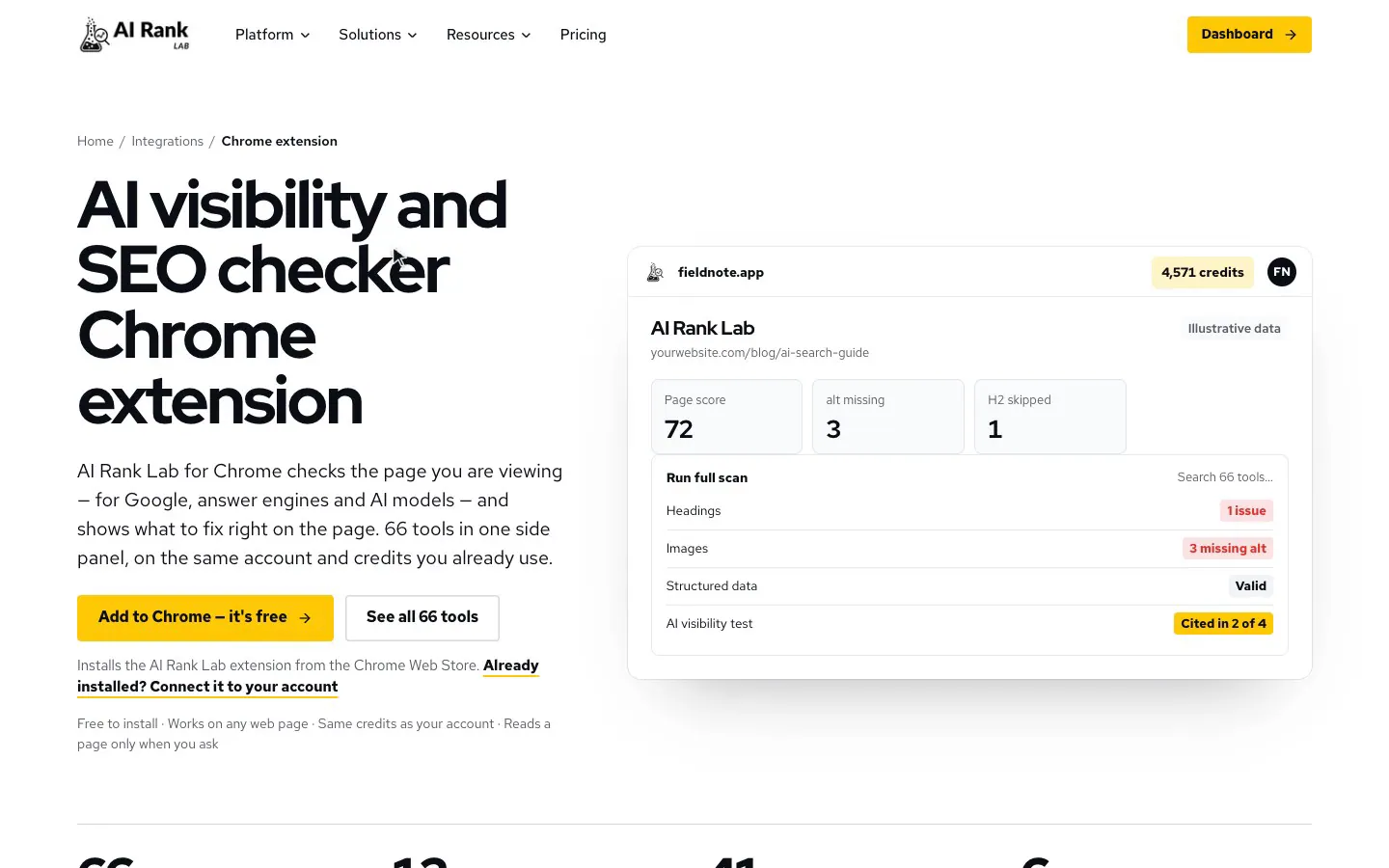
fieldnote.app4,571 credits

AI Rank Lab

yourwebsite.com/blog/ai-search-guide

Illustrative data
Page score
72
alt missing
3
H2 skipped
1
Run full scanSearch 66 tools…
  • Headings1 issue
  • Images3 missing alt
  • Structured dataValid
  • AI visibility testCited in 2 of 4
Tools in one side panel
66
Tool groups, from on-page to backlinks
12
Checks that cost 1 credit
41
AI answer sources you can test
6

From install to insight in under a minute

Add to Chrome

Install the extension from the Chrome Web Store and pin the AI Rank Lab icon to your toolbar.

ChromeIllustration of the side panel
  • AI Rank LabFree to install

Sign in once

Log in on airanklab.com and the extension connects to your account by itself — no keys to copy.

Create free account
airanklab.comIllustration of the side panel
  • AI Rank LabSame credits as your account

Open any page

Click the icon to open the side panel, run a full scan or pick a tool, and see the results beside the page.

AI Rank LabIllustration of the side panel
  • Headings1 issue
  • Structured dataValid
  • AI visibility testCited in 2 of 4

Everything you need to audit a page, without leaving it

Built for the way you actually work: open a page, spot the problem, fix it, prove it.

One click, full picture

The full page scan runs every in-browser check at once — meta tags, headings, images, links, structured data, content and more — and returns one score with a ranked list of fixes.

fieldnote.app4,571 credits

Full audit

yourwebsite.com/blog/ai-search-guide

Illustrative data
AI Rank Lab
  • Full page scan5 credits
  • Meta tags1 credit
  • Headings1 credit
  • Images1 credit
  • Structured data1 credit

See whether AI engines cite you

Ask ChatGPT, Claude, Gemini and Perplexity a prompt and see whether your site is cited — and who is cited instead. Check Google AI Overviews and AI Mode too.

AI visibility
fieldnote.app4,571 credits

AI visibility

yourwebsite.com/blog/ai-search-guide

Illustrative data
AI Rank Lab
  • AI visibility testAI
  • Google AI OverviewLive data
  • Google AI ModeLive data
  • Citability signals1 credit
  • llms.txt checker1 credit

Fixes, not just findings

Get rewritten titles and descriptions, alt text, FAQ blocks, structured data and llms.txt files, ready to paste into your CMS.

fieldnote.app4,571 credits

AI writing

yourwebsite.com/blog/ai-search-guide

Illustrative data
AI Rank Lab
  • Title and description writerAI
  • Alt text writerAI
  • FAQ generatorAI
  • Structured data generatorAI
  • llms.txt generatorAI

Issues marked on the page

Missing alt text, skipped heading levels, broken and nofollow links and weak passages are highlighted where they sit, so you see each problem in context.

Benchmark against competitors

Save up to two competitor pages and compare length, structure, markup and AI readiness side by side, then find the keyword and topic gaps.

Branded reports you can share

Export any result as a PDF or CSV under your own white-label branding, and reopen past reports in full screen whenever you need them.

66 tools, organised the way you audit

Pick a group to see every tool inside it. The same groups appear as chips at the top of the side panel, with search, pinned tools and recently used tools.

Full audit

2 tools

Scores and a complete issue list in one run.

  • Full page scan5 creditsRuns every on-page check that works in your browser in one go, with one combined score and issue list.
  • SEO, AEO and GEO auditPremiumScores the page for search engines, answer engines and AI models, lists every issue and fix, and marks the problem elements on the page.

On-page

8 tools

Everything on the page that search engines and AI read first.

  • Meta tags1 creditTitle, description, canonical, robots and social tags, with a search result preview.
  • Headings1 creditThe heading outline, with missing or repeated H1s and skipped levels marked on the page.
  • Images1 creditAlt text, file type, path, dimensions and weight of every image, shown on the image itself.
  • Links1 creditInternal, external and nofollow links, with empty or generic anchors highlighted.
  • Structured data1 creditEvery schema block on the page, whether it is valid, and what is missing for rich results.
  • Content and keywords1 creditWord count, reading ease, and the words and phrases the page uses most.
  • Social sharing preview1 creditHow the link looks when shared, with the sharing tags and image checked.
  • Search snippet editor1 creditTry a new title and description and see the search result, with where it would be cut.

Technical

10 tools

Can crawlers reach, render and index this page?

  • Indexability1 creditCan search engines index this page: status, robots tags and headers, and canonical.
  • Robots.txt and sitemap1 creditWhat robots.txt says about this address, and whether the page is listed in a sitemap.
  • Redirect and header trace1 creditEvery redirect step with its status, and where each way of writing the address ends up.
  • Canonical and duplicates1 creditDoes the canonical load and point to itself, and do duplicate addresses resolve correctly.
  • Broken link check1 creditChecks up to 60 links on the page and marks the broken and redirected ones.
  • Hreflang validator1 creditChecks each language version loads, links back, and uses valid language codes.
  • View as a crawler1 creditWhat Googlebot, GPTBot, ClaudeBot and PerplexityBot receive from this address.
  • Raw vs rendered1 creditWhat JavaScript changes — title, canonical, robots tags and how much text only appears after rendering.
  • Security and HTTPS1 creditHTTPS, files loaded insecurely, and the security headers the page sends, each explained.
  • Page weight1 creditRequests and bytes by type, the heaviest files, and what blocks the page from drawing.

AI visibility

13 tools

Is the page ready to be quoted — and is it actually being cited?

  • Answer readiness1 creditIs the page written so an AI system can lift an answer from it — direct answers under question headings.
  • Citability signals1 creditFigures, sources, quotes, an author and dates — what makes a page worth quoting.
  • Passage view1 creditHow a retrieval system would split the page into passages, and which ones stand on their own.
  • Brand and entity check1 creditWhether the page says clearly who publishes it: organisation markup and one consistent brand name.
  • AI crawler access1 creditWhich of 17 AI and search crawlers robots.txt lets read this page, and the rule that decides it.
  • llms.txt checker1 creditWhether the site has an llms.txt, whether it is well formed, and whether its links load.
  • How AI reads this pageAIWhat a language model takes the page to be about, its main claims, and what it could not find.
  • Prompt ideasAITen prompts people might type into an AI assistant that this page should answer.
  • AI visibility testAIAsks the AI engines you choose a prompt and reports which of them cite this site, and their sources.
  • AI prompt searchAIAsk ChatGPT, Perplexity, Claude and Gemini a prompt and keep every site they cite.
  • Ask the AI appsPremiumAsk ChatGPT, Perplexity, Claude and Gemini in your own signed-in tabs and capture the sites each answer cites.
  • Google AI OverviewLive dataWhether Google shows an AI Overview for a query, what it says, and whether this site is a source.
  • Google AI ModeLive dataGoogle's AI Mode answer for a query, with its sources and whether this site is one of them.

AI writing

8 tools

Ready-to-paste fixes written from the page itself.

  • Title and description writerAIThree title and meta description pairs for this page, each within the length search results show.
  • Rewrite a weak spotAIPick a title, heading or paragraph that buries its answer and get a clearer rewrite.
  • Alt text writerAIAlt text for up to 10 images that have none, written from the pictures themselves.
  • FAQ generatorAIQuestions and answers drawn from this page, with FAQPage markup ready to copy.
  • Structured data generatorAIJSON-LD for the types this page is missing, filled in from what the page says.
  • Content suggestionsAISections to add, questions left unanswered and parts to tighten, each tied to a heading.
  • llms.txt generatorAIWrites an llms.txt file for this site in the llmstxt.org format, to copy or download.
  • AI-writing checkAIHow machine-like the page's text reads — a hint, not a verdict.

Speed and experience

4 tools

Lighter images, clearer forms, every screen size.

  • Image savings1 creditHow much lighter images could be at their shown size and in WebP or AVIF.
  • Image optimizer1 creditResize the page's images to their shown size and convert them to WebP, JPEG or PNG.
  • Forms and calls to action1 creditEvery form and button: unlabelled or long forms, vague button text and hidden calls to action.
  • Device preview1 creditThe page in phone, tablet and laptop sized windows side by side, with a mobile check.

Competitors

4 tools

Your page beside the pages that outrank it.

  • Compare pages1 creditThis page beside your saved competitor pages: length, headings, structure, markup and AI readiness.
  • Keyword gap1 creditPhrases your competitors repeat that this page never uses, and the ones only you use.
  • AI gap analysisAIWhat competitors cover that this page does not, and the changes most likely to matter.
  • Ad library shortcuts1 creditOpens the Google, Meta, LinkedIn and TikTok ad libraries searched for this site.

Keywords and rankings

3 tools

Live Google results for the keywords that matter.

  • Rank checkLive dataWhere this page and site appear in Google's top 50 for a keyword, in the country you choose.
  • SERP checkerLive dataLive Google results for a keyword by country and device, with titles and snippets.
  • Search from another place1 creditOpen Google as someone in another country, language or town sees it.

Backlinks

5 tools

Who links to the site, how strongly and with what words.

  • Backlink overviewLive dataAuthority, backlinks, referring domains and the followed share, for the site or this page.
  • Referring domainsLive dataThe 100 strongest sites that link here, with their authority.
  • Anchor textLive dataThe words other sites use when they link here, and how links are shared between them.
  • Backlink listLive dataThe 100 strongest backlinks: source, link text and whether each is followed.
  • Authority of linked sitesLive dataThe authority of every site this page links out to, so weak ones stand out.

Local, shops and video

3 tools

Markup checks for local businesses, products and videos.

  • Local business check1 creditLocalBusiness markup against the address and phone visitors see, and the map link.
  • Product page check1 creditProduct markup against Google's merchant listing fields, and price consistency.
  • Video markup check1 creditVideoObject markup, captions, a transcript and chapters for each video.

Tracking and campaigns

3 tools

Analytics tags, pixels and campaign links.

  • Tags and pixels1 creditWhich analytics and advertising tags are on the page, their IDs, and whether they fired.
  • Campaign link builder1 creditBuild a tagged link to this page, with a naming check and saved templates.
  • Link parameter inspector1 creditThe tracking parameters on this address, explained, with a clean copy of the address.

About this site

3 tools

How the site is built and where it lives online.

  • Technology detector1 creditWhat the site is built with: platform, framework, libraries, CDN and embedded services.
  • Favicon checker and generator1 creditChecks the favicon set-up for browsers, phones and Google, and builds a full favicon package.
  • Social profiles1 creditThe social accounts this site links to, and which major ones are missing.

AI, Live data and Premium tools cost the same as they do on the AI Rank Lab website. The exact price is shown on every button before you run it.

Free to install. Pay only for what you run.

The extension uses the credits in your AI Rank Lab account — the same credits as the website, with no separate subscription.

Free · to install

The extension costs nothing. Sign in with a free or paid AI Rank Lab account.

1 credit · per check

41 on-page, technical, AI-readiness, tracking and site checks.

5 credits · full page scan

Every in-browser check in a single run, with one combined score.

Website price · AI and live data

AI writing, AI visibility tests, live Google and backlink data cost exactly what they cost on the website.

The price is shown on every button before you run it, and any run of 50 credits or more asks you to confirm first.

See plans and credit packs

Your browsing stays yours

The extension does one job — auditing the page you ask it to — and nothing in the background.

Read the extension privacy policy
  • Reads a page only when you run a tool on it.
  • Never records your browsing history, form entries, passwords or keystrokes.
  • On-page inspectors analyse the page inside your browser.
  • We never sell your data or use it for advertising.
  • Disconnect any browser at any time from Settings → Connected extensions.

Questions, answered

Something else? Ask the team

Is the AI Rank Lab extension free?

Installing it is free. Tools use credits from your AI Rank Lab account — the same credits you use on the website. On-page and technical checks cost 1 credit, and the price of every tool is shown before you run it.

Do I need an AI Rank Lab account?

Yes. Create a free account, sign in on airanklab.com, and the extension connects to it automatically. You can also click Sign in inside the extension.

Does the extension track my browsing?

No. It reads a page only when you run a tool on it, and it does not record the pages you visit, what you type into forms, passwords or cookies from other sites.

Which AI engines can I test my visibility in?

ChatGPT, Claude, Gemini and Perplexity, plus Google AI Overviews and Google AI Mode. You choose which engines to ask for each prompt and pay per engine.

Can I audit competitors' pages?

Yes. The extension works on any regular web page you can open. Save up to two competitor pages to compare them with yours side by side.

Can I export reports for clients?

Yes. Every tool exports to PDF and CSV. If you have set white-label branding in your AI Rank Lab dashboard, reports carry your logo and colours. Past reports can be reopened at any time.

Which browsers does it support?

The extension is built for Google Chrome on desktop and opens in Chrome's side panel.

How do I disconnect the extension?

Click Sign out inside the extension, or go to Settings → Connected extensions on airanklab.com and disconnect any browser. Uninstalling removes everything the extension stored in your browser.

Audit your next page in one click

Install AI Rank Lab for Chrome and see what search engines and AI models see — then fix it before your competitors do.