


Why Your robots.txt Matters More Than Ever in 2026
The robots.txt file was designed in 1994 to tell web crawlers which pages to avoid. For 30 years, webmasters only needed to worry about one major crawler family: Googlebot. In 2026, that list has expanded dramatically. AI companies - OpenAI, Anthropic, Perplexity, Google - all run dedicated crawlers that read your content to train models, build knowledge bases, and generate AI search responses.
Whether you allow or block these crawlers has direct consequences for your AI search visibility. If GPTBot cannot crawl your site, your content does not inform ChatGPT's responses. If you block PerplexityBot, Perplexity cannot cite your pages. If Google-Extended is blocked, your content may not appear in Google's AI Overviews and AI Mode responses.
Getting robots.txt right for the AI crawler era requires understanding which bots exist, what they do, and how to configure access in a way that protects your content while maximizing AI citation potential. This guide covers all of it - including a free robots.txt generator you can use to create an AI-ready configuration in minutes.
The Complete AI Crawler Directory
Before you configure anything, you need to know which bots to address. Here are the major AI crawlers and their user agents as of 2026:
OpenAI - ChatGPT
- User-agent: GPTBot
- Purpose: Training data collection and ChatGPT Browse feature
- Impact of blocking: Your content will not inform ChatGPT responses or appear in ChatGPT Browse citations
- Documentation: OpenAI maintains a public list of GPTBot IP ranges
Anthropic - Claude
- User-agent: ClaudeBot (also identified as anthropic-ai)
- Purpose: Training data and knowledge base for Claude AI
- Impact of blocking: Your content does not inform Claude's responses when users ask about your topic area
- Documentation: Anthropic published its crawling policy and respects robots.txt directives
Perplexity AI
- User-agent: PerplexityBot
- Purpose: Real-time web search for Perplexity AI answers and citations
- Impact of blocking: Your pages will not be cited in Perplexity answers, even when highly relevant
- Documentation: Perplexity respects robots.txt and has published crawling guidelines
Google - AI Features
- User-agent: Google-Extended
- Purpose: Google Bard/Gemini training and AI Overviews content
- Impact of blocking: Your content may not appear in Google's AI Overviews, AI Mode, or Gemini responses
- Note: This is separate from Googlebot. You can allow Googlebot (traditional search) while blocking Google-Extended (AI features)
Microsoft - Copilot
- User-agent: Bingbot (shared), Copilot-specific crawlers vary
- Purpose: Powers Microsoft Copilot and Bing AI answers
- Impact of blocking: Reduced visibility in Microsoft Copilot and Bing AI features
Meta - Llama
- User-agent: FacebookBot, Meta-ExternalAgent
- Purpose: Training data for Meta AI and Llama models
- Impact of blocking: Your content does not inform Meta AI responses
Apple - Applebot
- User-agent: Applebot, Applebot-Extended
- Purpose: Siri, Apple Intelligence, and Apple Search features
- Impact of blocking: Reduced visibility in Siri and Apple AI features
The Problem: Most robots.txt Files Were Written Before AI Crawlers Existed
A typical robots.txt from 2020-2023 looks like this:
User-agent: *
Disallow: /admin/
Disallow: /private/

User-agent: Googlebot
Allow: /

Sitemap: https://example.com/sitemap.xml
This configuration allows Googlebot but relies on the wildcard rule for all other bots. Depending on interpretation, the wildcard rule might be blocking AI crawlers from sections of your site - or allowing them everywhere including pages you would prefer to protect.
Worse, some sites added aggressive blocking during the early AI crawler period (2022-2023) when publisher backlash against AI training data use was at its peak. If your site added Disallow: / for all bots, you may have locked out AI crawlers and forgotten about it. The consequences only become visible when you notice your brand is underrepresented in AI search responses.
AI Rank Lab's AI bot tracking feature shows you which AI bots are actually visiting your pages and which AI assistants send you referral traffic - without requiring manual log analysis. If a crawler you meant to allow never shows up, check its rules in your robots.txt.
Robots.txt Templates for Different Scenarios
Use our free robots.txt generator to customize these templates for your site. Below are the most common configurations:
Template 1: Full AI Access (Recommended for Most Sites)
Allow all AI crawlers to access your content. Best for sites that want maximum AI search visibility and are comfortable with their content informing AI model training.
# Standard search crawlers
User-agent: *
Disallow: /admin/
Disallow: /private/
Disallow: /checkout/
Disallow: /account/

# Traditional search engines
User-agent: Googlebot
Allow: /

User-agent: Bingbot
Allow: /

# AI Crawlers - explicitly allowed
User-agent: GPTBot
Allow: /

User-agent: ClaudeBot
Allow: /

User-agent: anthropic-ai
Allow: /

User-agent: PerplexityBot
Allow: /

User-agent: Google-Extended
Allow: /

User-agent: Applebot-Extended
Allow: /

Sitemap: https://yoursite.com/sitemap.xml
Template 2: Selective AI Access (Content Protection)
Allow AI crawlers on public content pages but block premium content, paywalled articles, and member areas. Best for subscription publishers and sites with gated content.
User-agent: *
Disallow: /admin/
Disallow: /members/
Disallow: /premium/
Disallow: /checkout/

User-agent: Googlebot
Allow: /

# AI Crawlers - public content only
User-agent: GPTBot
Allow: /blog/
Allow: /resources/
Allow: /about/
Disallow: /premium/
Disallow: /members/

User-agent: ClaudeBot
Allow: /blog/
Allow: /resources/
Disallow: /premium/

User-agent: PerplexityBot
Allow: /
Disallow: /premium/
Disallow: /members/

User-agent: Google-Extended
Allow: /
Disallow: /premium/

Sitemap: https://yoursite.com/sitemap.xml
Template 3: Block AI Training, Allow AI Search
A nuanced configuration: allow Perplexity (which uses your content for real-time citations) but block training crawlers (which use your content to train models). This is a common middle ground for publishers who want AI search citations but object to model training use.
User-agent: *
Disallow: /admin/
Disallow: /private/

User-agent: Googlebot
Allow: /

# Perplexity - real-time citations, allow
User-agent: PerplexityBot
Allow: /

# Google AI features - allow for AI Overviews
User-agent: Google-Extended
Allow: /

# OpenAI training - block
User-agent: GPTBot
Disallow: /

# Anthropic training - block
User-agent: ClaudeBot
Disallow: /

User-agent: anthropic-ai
Disallow: /

Sitemap: https://yoursite.com/sitemap.xml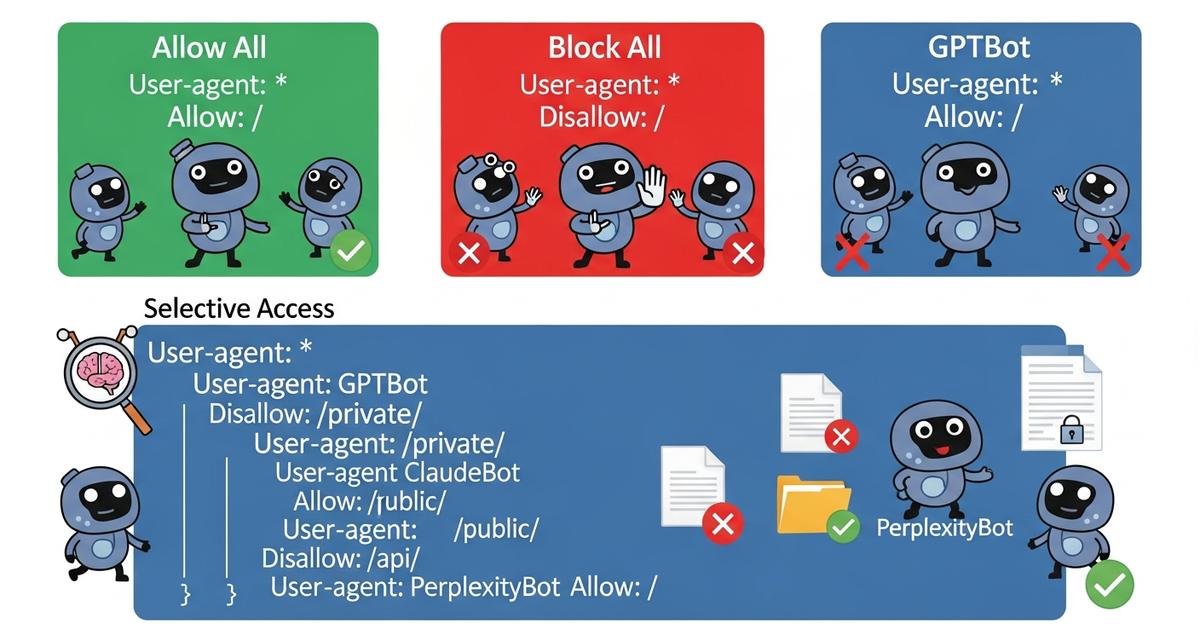
How to Decide Which Configuration Is Right for You
The right robots.txt configuration depends on your content type, business model, and AI search visibility goals. Use this decision framework:
Allow all AI crawlers if:
- Your site publishes openly accessible content (blog, documentation, resources)
- You want maximum AI search visibility and citations are a traffic source
- You do not have gated or premium content that requires protection
- Your content is informational and benefits from wide distribution
Use selective access if:
- You have a mix of free and premium content
- Some pages should not be cited (account pages, checkout flows, member-only content)
- You want AI crawlers to focus on your best content rather than crawling everything
Block training crawlers (allow search only) if:
- You are a publisher with concerns about AI training data use
- You still want to appear in Perplexity and Google AI Overviews (real-time citation)
- You want to preserve the option to license your content to AI companies separately
Block all AI crawlers only if:
- You have explicit legal or competitive reasons to keep content out of AI systems
- You have a licensing agreement with specific AI companies and want to enforce exclusivity
- You understand the trade-off: zero AI search visibility for your domain
Common Mistakes to Avoid
Mistake 1: Using a wildcard block for unknown bots
Configurations like User-agent: * / Disallow: / followed by specific allow rules for Googlebot will block all AI crawlers because they do not have explicit allow rules. Always be explicit about AI crawler access.
Mistake 2: Not knowing your current configuration
Many teams do not know what their robots.txt currently says about AI crawlers. Check it at yoursite.com/robots.txt right now. AI Rank Lab's tools can also help: the free site audit checks that your robots.txt is present and reachable.
Mistake 3: Confusing Googlebot with Google-Extended
Allowing Googlebot does not automatically allow Google-Extended (the AI features crawler). If you want to appear in Google AI Overviews and AI Mode, you need an explicit rule allowing Google-Extended.
Mistake 4: Not testing after changes
After updating your robots.txt, verify the changes took effect by checking the live file and using a robots.txt testing tool. Google Search Console has a built-in robots.txt tester for Googlebot, but you will need to manually verify AI crawler rules.
Mistake 5: Setting it and forgetting it
New AI crawlers appear regularly. The list of AI user agents from 2023 is already incomplete in 2026. Review your robots.txt at least quarterly and check for new AI crawler documentation from major AI companies.
Beyond robots.txt: The Complete AI Crawler Control Stack
robots.txt is the most important but not the only lever for controlling AI crawler access. A complete AEO technical setup includes:
- robots.txt: Crawler access rules (covered above)
- llms.txt: A guidance file for LLMs about what your site covers and how content should be used - complementary to robots.txt, not a replacement
- noindex meta tags: Page-level control that prevents specific pages from being indexed, respected by some AI crawlers
- AI bot monitoring: Track which crawlers are accessing your site and how frequently - AI Rank Lab's bot tracking feature provides this visibility without log analysis
Use the Free robots.txt Generator
Rather than writing your robots.txt from scratch, use AI Rank Lab's free robots.txt generator. Select your configuration type (full access, selective, block training, or custom), specify any paths to protect, and it will generate a correctly formatted file with all current AI crawler user agents included. You can copy the output directly to your server or download it as a file.
The generator is kept up to date as new AI crawler user agents are released - so you get a configuration that accounts for bots that did not exist when this article was written.
Conclusion
Your robots.txt is a direct control panel for AI search visibility. Getting it right means AI crawlers can access and learn from your content, which translates to citations in ChatGPT, Perplexity, Claude, and Gemini responses. Getting it wrong - or leaving an outdated file in place - means invisible barriers between your content and the AI engines that increasingly drive discovery.
The five-minute investment of checking your current robots.txt and using the free generator to create an AI-ready configuration is one of the highest-leverage technical actions you can take for AI search visibility. Do it today, then set a reminder to review quarterly as new AI crawlers enter the ecosystem.
Frequently Asked Questions
Which AI crawlers should I allow in my robots.txt?▾
What happens if I block GPTBot in my robots.txt?▾
Is Google-Extended the same as Googlebot?▾
Can I block AI training crawlers but still appear in AI search results?▾
How do I check if AI crawlers can access my site right now?▾
Get a Free AI Ranking Consultation
Want to improve your brand's visibility in AI search engines like ChatGPT, Gemini, and Perplexity? Fill out the form and our experts will create a personalized strategy for you.

Written by
Devanshu
Chief Marketing Officer & AI Search Optimization Architect
Digital Marketing Strategist & Pioneer in SEO, Answer Engine Optimization (AEO), and Generative Engine Optimization (GEO).


