

What the tracker counts, and what it doesn't
Why server-side crawlers like GPTBot never appear, and how to read the data honestly.
Listen to this lesson · 3:01
In shortThe AI bot tracker counts what a JavaScript tag on your pages can see: people who click through from an AI answer, and AI agents that load your page in a real browser. It does not see AI crawlers such as GPTBot, ClaudeBot or PerplexityBot, because they fetch your HTML without running scripts, so the tag never fires for them. To see crawler visits, read your server or CDN logs.
Two kinds of AI traffic
"AI traffic" means two different things, and they show up in different places.
- AI crawlers are programs that fetch your pages so an AI company can train a model or build a search index. They request your HTML, read the text and leave. Examples are GPTBot, ClaudeBot and PerplexityBot.
- AI-referred visitors are people. Someone asks ChatGPT or Perplexity a question, sees your page cited, and clicks the link. Their browser loads your page like any other visit.
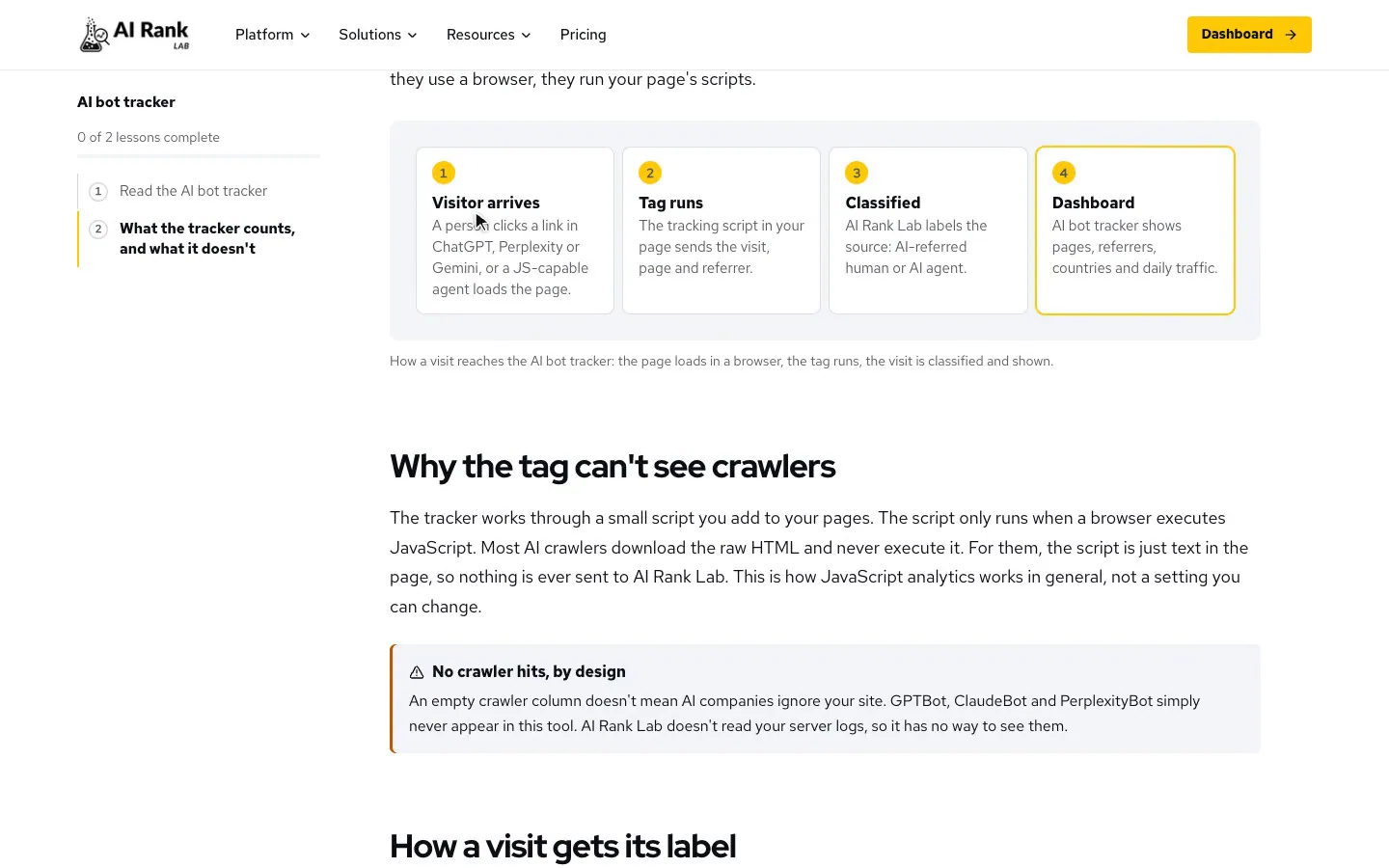
There's a third, smaller group: AI agents that drive a real browser to complete a task for someone. Because they use a browser, they run your page's scripts.
- Visitor arrivesA person clicks a link in ChatGPT, Perplexity or Gemini, or a JS-capable agent loads the page.
- Tag runsThe tracking script in your page sends the visit, page and referrer.
- ClassifiedAI Rank Lab labels the source: AI-referred human or AI agent.
- DashboardAI bot tracker shows pages, referrers, countries and daily traffic.
Why the tag can't see crawlers
The tracker works through a small script you add to your pages. The script only runs when a browser executes JavaScript. Most AI crawlers download the raw HTML and never execute it. For them, the script is just text in the page, so nothing is ever sent to AI Rank Lab. This is how JavaScript analytics works in general, not a setting you can change.
An empty crawler column doesn't mean AI companies ignore your site. GPTBot, ClaudeBot and PerplexityBot simply never appear in this tool. AI Rank Lab doesn't read your server logs, so it has no way to see them.
How a visit gets its label
When the script runs, it decides what kind of visit it is, in this order:
- User agent. If the browser's name contains a known AI name (for example ChatGPT, Claude, Perplexity or Copilot), the visit gets that label.
- Referrer. Otherwise, if the visitor came from a known AI site, such as
chatgpt.comorperplexity.ai, it's labelled with that engine. Most AI rows you'll see come from this rule. - Generic words. Otherwise, if the user agent contains short strings such as "bot", "crawler", "spider" or "ai", it's labelled AI Bot.
- Everything else is a human visit, later split into Google, direct and other sources.
The tag also stores UTM parameters, but it doesn't use them for the label. A click from an AI app that sends no referrer, even with utm_source=chatgpt.com in the link, is counted as an ordinary human visit.
The generic rule is broad. Search engine crawlers that render JavaScript can land in AI Bot, Bing's regular crawler is labelled Bing AI, and a visitor coming from DuckDuckGo search is labelled DuckDuckGo AI. A few ordinary browsers whose user agent happens to contain those letters can be caught too. Check the referrer column before you call a row AI.
What shows up where
| Who visits | Runs your JavaScript? | In the AI bot tracker? | Where to see it |
|---|---|---|---|
| A person who clicks a link in an AI answer. | Yes. | Yes, when the referrer is passed. | AI bot tracker, or GA4 referral reports. |
| An AI agent using a real browser. | Yes. | Sometimes, if its user agent or referrer gives it away. | AI bot tracker; otherwise it looks human. |
| AI crawlers such as GPTBot, ClaudeBot, PerplexityBot. | Usually not. | No. | Your server access logs or CDN logs. |
| A search crawler that renders pages. | Sometimes. | Possibly, under a generic label. | Search Console crawl stats and server logs. |
How to see crawler visits instead
If you want to know whether AI crawlers fetch your pages, you need logs from the machine that serves them. This is general advice; the exact steps depend on your host.
- Server access logs. Most hosts let you download them. Search for user agent names such as GPTBot, ClaudeBot, PerplexityBot or OAI-SearchBot to see which URLs were fetched and when.
- CDN logs and bot reports. If your site sits behind a CDN, its dashboard may group requests by bot or show AI crawler activity.
- Check before you trust a name. Anyone can fake a user agent. Some AI companies, OpenAI and Anthropic among them, publish the IP ranges their crawlers use, so compare against those where they exist.
- robots.txt decides access. Whether crawlers may fetch your site is set in robots.txt. If you block them there, an empty log is the expected result.
Reading the tracker honestly
- Call the AI numbers AI-referred visits, not crawls, even where a card says "crawls" or "indexing", or a progress report says "AI crawler visits".
- Trust rows with an AI referrer most. Treat AI Bot rows as unclassified.
- Expect some under-counting: AI apps that don't pass a referrer look like direct traffic.
- Use the tracker for trends and for which pages AI answers send people to. That's what it measures well.
AI Rank Lab covers the other side through brand visibility, which shows whether AI answers cite your pages in the first place. Together they show citations going in and visits coming out.
Check yourself
0 of 3 answered.
Progress is saved in this browser.
Transcript
Put the lesson to work
Paste your site and get a free SEO, AEO and GEO audit with the fixes, then come back to the next lesson.