

How credits work
One balance pays for every tool. See what is free, what costs credits, and how to check a price before you run anything.
Listen to this lesson · 2:47
In shortAI Rank Lab runs on one credit balance. Credits come from your plan, one-time packs, the onboarding bonus and refunds. Running a tool spends credits and most tools show the price before you run; reading results you already have is free. When you run short, the tool stops and offers a top-up. Buy packs in Settings → Coins & Credits. A few older tools still use a separate legacy coin wallet.
One balance for everything
Almost every paid action in the dashboard, from an AEO and GEO audit to a prompt run, an article or an email campaign, is paid from the same balance. There is no separate allowance per tool; the few exceptions are listed at the end of this lesson. You'll see the number in the dashboard header; clicking it opens Settings → Coins & Credits.
You'll meet the word "coins" in a few places, such as the Buy Coins button or the per-scan price printed under the audit box. In almost every case that is just an older name for the same credits.
Where credits come from
| Source | What it is | Where |
|---|---|---|
| Onboarding bonus | A one-time gift when you finish onboarding, once per account and per network. | Automatic |
| Plan | A monthly credit allowance with a subscription. | Settings → Plans, see /pricing |
| Credit pack | A one-time top-up of 1,000, 2,000 or 6,000 credits. No subscription. | Settings → Coins & Credits |
| Refund | Credits returned when a tool reserves more than it uses or fails after charging. | Automatic, listed under Refunds |
What costs credits and what is free
The rule is simple: running something that calls an AI model, a search provider or a crawler costs credits. Looking at results you already have, building comparisons from runs you've done, and publishing an article you wrote are free.
Some tools charge by size. A site audit charges per page crawled; a prompt run charges per AI engine, so running one question on four engines costs four times one engine. Keyword research reserves the worst case up front and refunds what it didn't use, and the backlink checker only charges when data comes back.
Checking a price before you run
- Most tools print the price next to the run button, for example under the AEO and GEO checker's URL box.
- Bigger actions, such as generating an article or an action plan, open a confirmation box that says what it will cost and what you have. Confirm is disabled if you can't afford it.
- Prompt runs cost per engine, and the Select Engines to Run box starts with every engine ticked and shows no price. Untick the ones you don't need before you click Run Now.
The brand visibility setup wizard and the Run Now box pre-select several engines. On a small balance, tick one engine. Otherwise the run asks for several times what you expected and stops for lack of credits, and the Run Now box only says "Run failed. Please try again."
When you run out
If you try a paid action without enough credits, nothing runs and nothing is charged. Many tools open a Buy Credits window that says how many credits you tried to use and how many you have. A few older pages show an "Insufficient credits" message in the page instead. Either way, top up and run it again. Ongoing services stop too: the AI bot tracker pauses at zero and restarts after a top-up.
Buying a pack
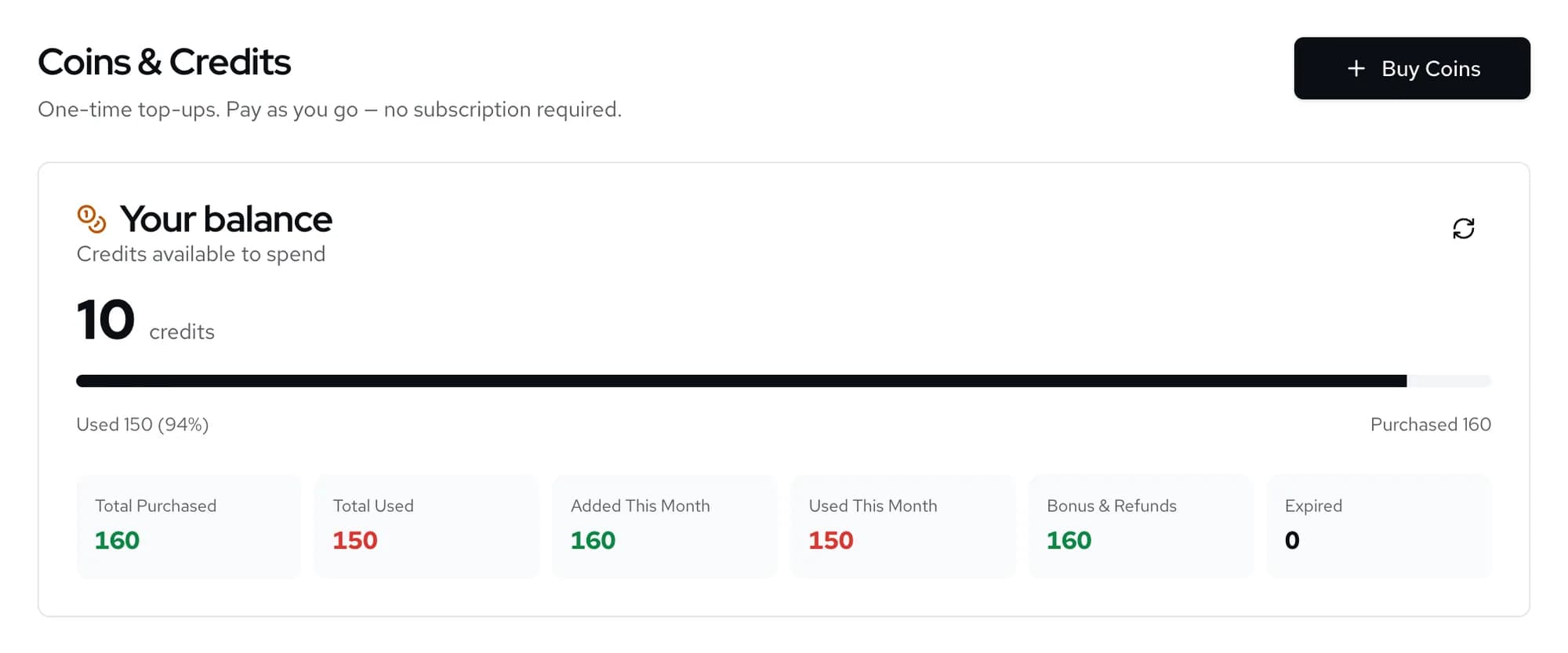
- Open Coins & CreditsGo to Settings → Coins & Credits, or click your balance in the dashboard header. The Your balance card shows what you have, with totals for purchased, used, added and used this month, bonuses and refunds.
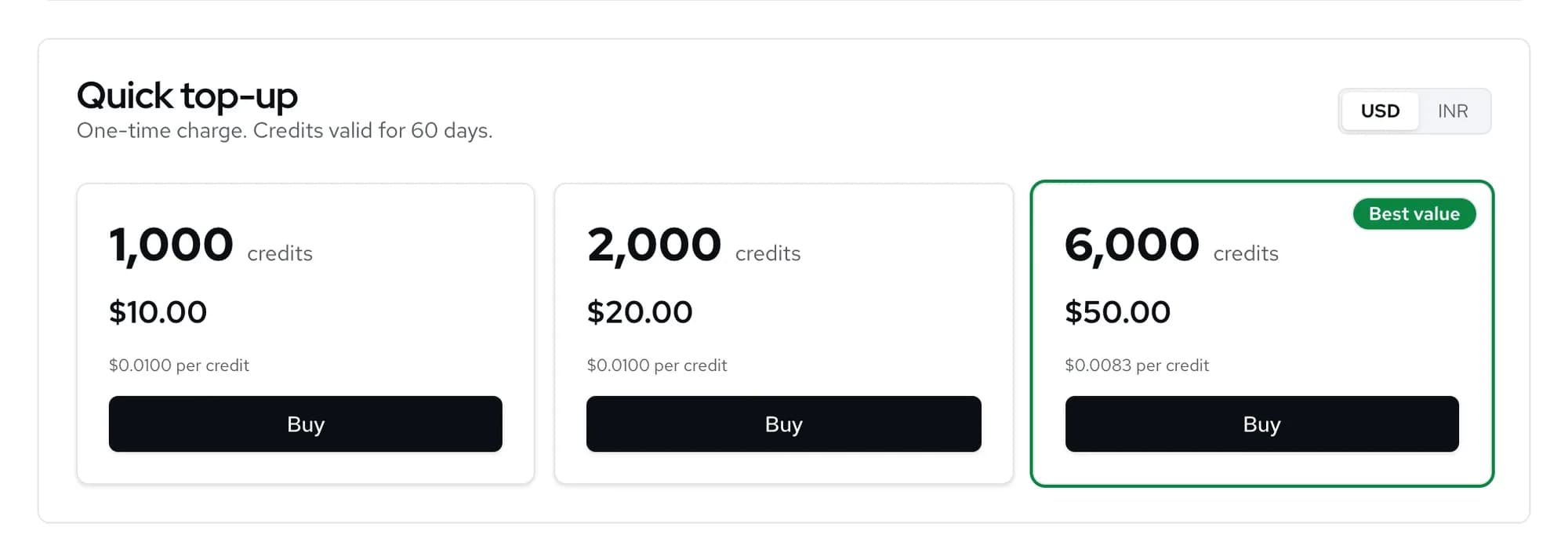
Settings → Coins & Credits. - Pick a packUnder Quick top-up, choose 1,000, 2,000 or 6,000 credits. Switch between USD and INR to see the price in your currency; the largest pack is marked Best value. Click Buy and pay in the checkout window.
Prices are shown on the page. - Check the historyUsage by feature shows where your credits went. Transaction history lists every addition and charge; filter by Usage, Purchases, Subscription, Bonus, Refunds or Expired, and use Export CSV for your records.
The top-up card says pack credits are valid for 60 days. Buy what you expect to use in that window, and use a plan if you need credits every month.
Two exceptions to know about
A few older tools still charge a separate legacy coin balance instead of your credits: the competitor content-strategy scan and its Generate Insights step on AI search → Brand visibility → Competitors, the public LLMs.txt generator page and the AXP checker page. That wallet isn't shown on the Coins & Credits page, so these tools can say you have too few coins while your credit balance is healthy. The dashboard's own LLMs.txt generator under Content uses normal credits. If you hit this, contact us.
The second exception is team sharing. Credits you allocate to a teammate leave your balance straight away, but their usage is still charged to your live balance, so the allocation is not a spending cap. Share a domain covers this.
Check yourself
0 of 3 answered.
Progress is saved in this browser.
Transcript
Put the lesson to work
Paste your site and get a free SEO, AEO and GEO audit with the fixes, then come back to the next lesson.